Running a global Shopify store means catering to shoppers worldwide – but it also means navigating a web of regional privacy laws.
Until today, most merchants had to choose between two frustrating options: show a strict EU-style “Opt-in” banner to everyone (and lose critical analytics and ad conversion data worldwide), or risk costly compliance penalties in countries with strict data privacy regulations.
That changes today.
We are excited to launch Smart Geo-targeting, now available on the Consentik Advanced Plan.
Why One Cookie Banner No Longer Works for Global E-commerce
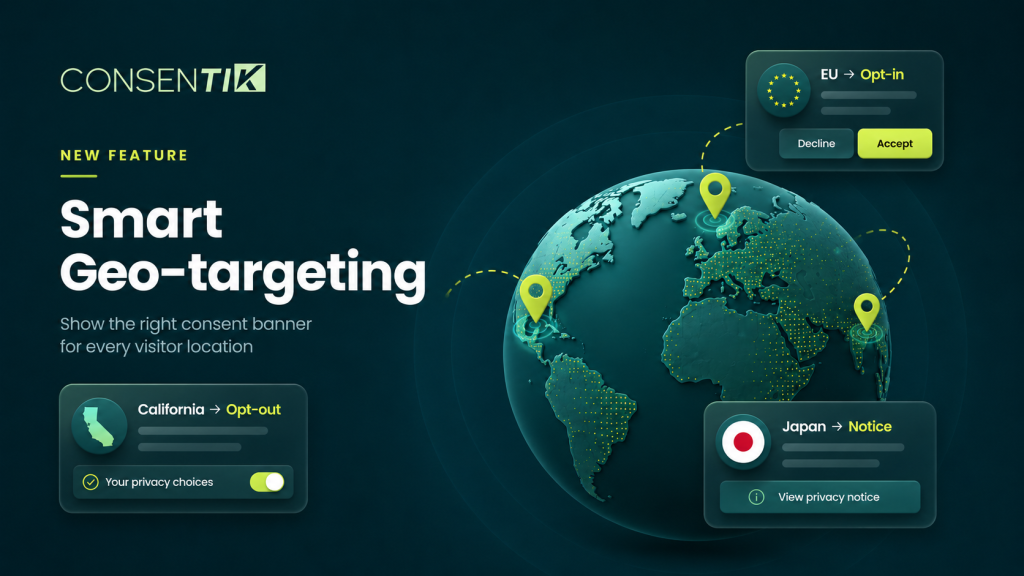
Privacy laws vary significantly around the world. A “one-size-fits-all” banner either hurts your analytics or compromises your compliance. Broadly, global privacy regulations fall into three distinct consent models:
| Consent Model | Regions | Tracking Behavior | Required User Action |
| 🟢 Opt-In | EU/EEA, UK, GDPR-style laws | Blocked until explicit consent is given | Accept & Decline buttons displayed equally |
| 🟠 Opt-Out | US States (CCPA/CPRA) | Runs immediately on page load | Visitor can opt out anytime (“Do Not Sell/Share”) |
| 🔵 Notice | Japan, Australia, New Zealand, etc. | Runs immediately on page load | Informational banner with an Accept/Close button |
When you show an Opt-in banner to visitors in Japan or the US, you are needlessly blocking tracking scripts before shoppers make a choice. Smart Geo-targeting eliminates this friction by matching the exact banner mode to your visitor’s location.
What Smart Geo-Targeting Does
When enabled, Consentik detects each visitor’s location across 284 regions (every country plus individual US states) using IP geolocation and automatically serves the exact consent banner required by local law.
Key Highlights for Merchants
- Automatic Compliance & Maintenance: No need to stay up to date with changing international laws. Regions with strict privacy mandates (like Germany for GDPR or California for CCPA) are automatically locked to their required mode.
- Maximized Analytics & Ad Data: In regions that follow Notice or Opt-out models, tracking begins from the very first pageview. You capture 100% of your analytics and ad attribution without sacrificing compliance where it matters.
- Automatic GPC Signal Handling: In US Opt-out states, Global Privacy Control (GPC) signals sent by modern browsers are honored automatically.
- Google Consent Mode v2 Ready: Your Google Consent Mode setup requires zero reconfiguration. Consentik sends
grantedordeniedupdates to Google tags dynamically based on the visitor’s location and choices.
What’s New in Your Consentik Dashboard
To give you complete control and visibility, we’ve updated key areas in your app admin:
1. Geolocation Tab
Smart Geo-targeting Card: Turn the feature on or off with a single toggle. (It remains off by default, keeping your existing banner untouched until you’re ready).
Coverage Counter: View a live breakdown of how many regions sit in Opt-in, Opt-out, and Notice modes based on your active rules.
Preview by Visitor Location: Search any country or US state to preview the exact banner, layout, and compliance badge a visitor from that region will see.
2. Behavior Tab
Independent Consent Checkboxes: Select Consent Behavior now features three modular checkboxes (Accept, Decline, and Preferences) labeled with clear legal tags.
Automated Data Sale Controls: The CCPA “Do not sell or share my personal data” control activates automatically for visitors in Opt-out states.
3. Region Grid & Fine-Tuning
Locked vs. Adjustable Regions: Regions with strict statutory mandates show a 🔒 icon and are locked to their compliant mode to protect you from accidental misconfiguration. Unregulated regions remain fully customizable to fit your business preferences.
How to Enable Smart Geo-Targeting in 4 Simple Steps
-
Open your Consentik Admin and navigate to Settings > Geolocation.
-
Locate the Smart Geo-targeting card and switch the toggle to On.
-
Use the Preview by visitor location tool to test how your banner appears in key target markets.
-
Click Save to publish.
ℹ️ Note for Existing Merchants: Your current design, copy, and behavior settings are automatically migrated to serve as your global Opt-in baseline. Turning Smart Geo-targeting off restores your single global banner seamlessly with zero data loss.
Ready to Optimize Your Global Store Compliance?
Smart Geo-targeting is live today for all merchants on the Consentik Advanced Plan.
Optimize Your Global Store Compliance with Consentik
Smart Geo-targeting – the right cookie banner for every region