Under privacy regulations like GDPR (Articles 12–15) and CCPA, customers have the legal right to ask what personal data you store, request complete deletion, or demand an export of their records. By law, merchants must fulfill these requests within a strict 30-day window. Because Wix does not have a native system to collect, verify, and log data subject access requests (DSAR), most store owners end up fielding scattered emails. Without a structured workflow, deadlines get missed, store teams waste hours parsing unverified messages, and merchants are left without an audit trail if a regulator audits their compliance.
Consentik solves this operational bottleneck with the launch of Data Requests (DSAR) on Wix. Instead of letting privacy emails pile up in a support inbox, merchants can now deploy a dedicated intake channel directly inside their cookie banner and preferences popup. The feature verifies the requester’s identity, logs an auditable Request ID, starts a 30-day countdown timer, and organizes fulfillment steps in a structured merchant dashboard.
Streamline GDPR & CCPA Compliance: How Consentik DSAR Works on Wix
Consentik provides an end-to-end management pipeline that captures privacy requests, filters out illegitimate submissions, and organizes your administrative workload before any legal deadline expires.
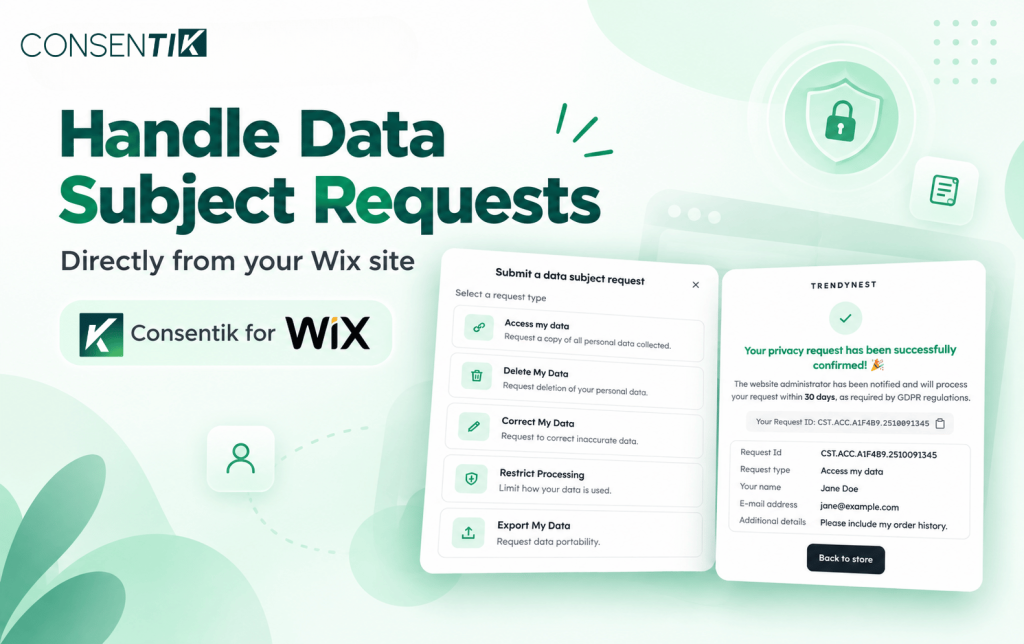
- Front-End Request Intake: Visitors access a clean, mobile-responsive modal by clicking “Submit a data subject request” from your cookie banner, preferences popup, or both. No customer account login is required.
- 1-Hour Email Verification: To protect store inboxes from spam and malicious impersonation, every submitter must verify their email within one hour via an automated confirmation link. Unverified submissions never reach your queue.
- Automated 30-Day Countdown & Request IDs: Once verified, the request receives a unique identifier (such as
CST.ACC.A1F4B9.2510091345) built from the request type, creation timestamp, and a one-way hash of the email address (containing no readable personal data). A 30-day countdown timer begins immediately upon verification. - Consentik Privacy Boundary: Consentik transmits and logs requests, but never accesses, stores, or processes the actual contents of your customer data. Finding, updating, deleting, or exporting customer files remains in your hands; Consentik delivers the workflow, communication framework, and compliance audit trail.
Five Customer Privacy Rights Wix Merchants Can Now Automate
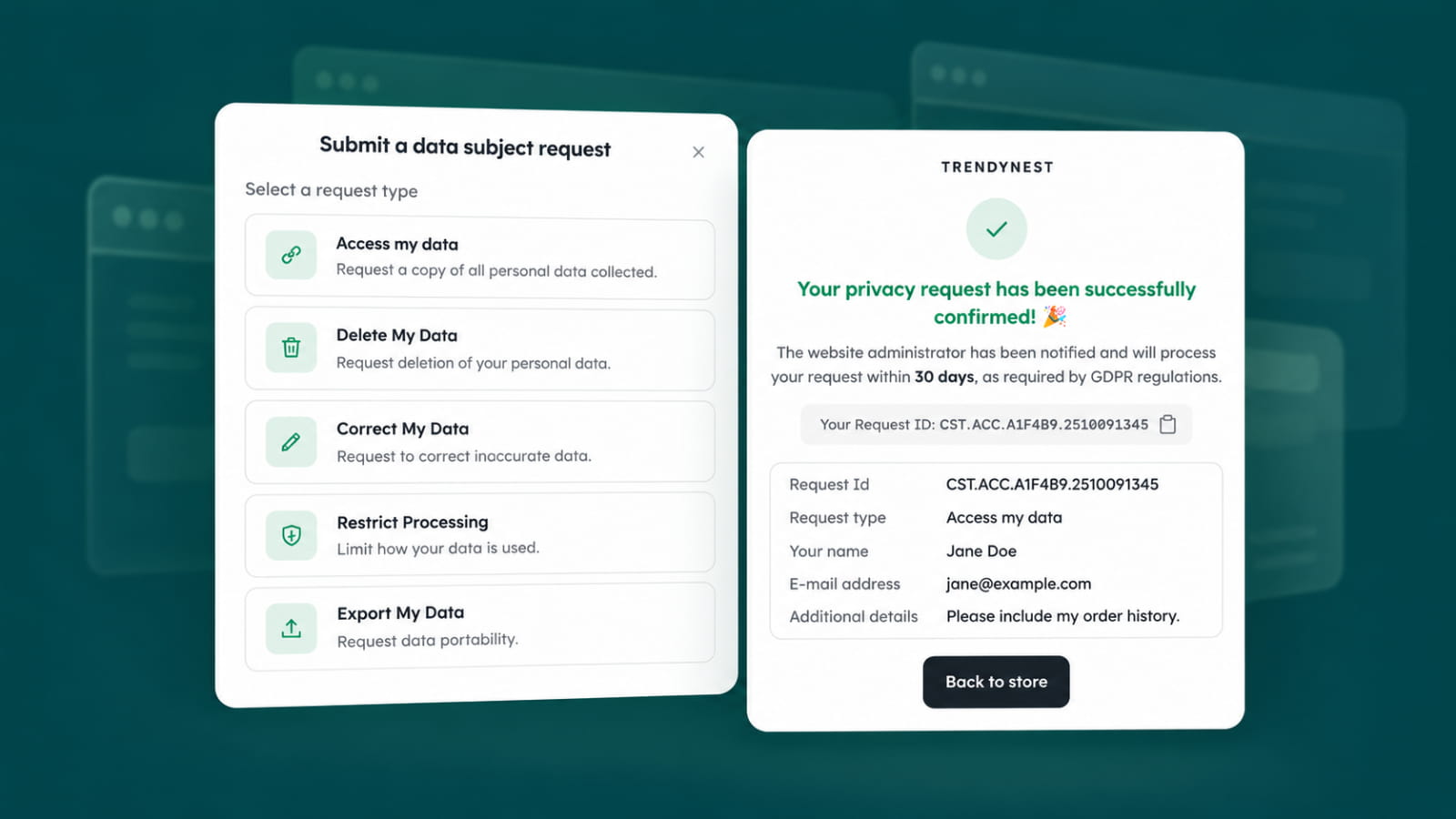
Rather than drafting ad-hoc policies or responding to ambiguous customer emails, the popup provides five distinct, standardized privacy request types that visitors can select with a single click.
- Access My Data: The customer requests a copy of all personal data your store has collected about them.
- Delete My Data: The customer requests the permanent deletion of their personal information across your store records.
- Correct My Data: The customer identifies and submits corrections for inaccurate personal records.
- Restrict Processing: The customer asks to place specific limitations on how your store utilizes their personal data.
- Export My Data: The customer requests a portable, machine-readable copy (such as CSV, JSON, or PDF) of their personal data.
Every request type title and description can be customized inside the Consentik admin to align with your store’s brand voice and legal terminology.
Operational and Legal Benefits of Automated DSAR for Wix Stores
Handling compliance manually creates severe administrative overhead and introduces unnecessary legal exposure for growing e-commerce brands. Automating your intake workflow resolves these operational challenges across two core areas:
Eliminating Spam and Identity Fraud: Receiving DSAR requests via standard contact forms leaves merchants vulnerable to impersonation and spoofing. Consentik’s mandatory 1-hour email verification ensures that your team only reviews authenticated requests from genuine inbox owners.
Enforcing Response Timelines with an Audit Trail: Privacy regulators penalize businesses for failing to respond within statutory deadlines. Consentik displays a clear “Respond by {date}” callout in your admin and automatically flags overdue tickets as “Expired.” The built-in activity log tracks submission, verification, status changes, and final responses, giving you documented proof of compliance.
Guided Fulfillment via Task Checklists: Each ticket slides out an administrative drawer containing a type-specific processing checklist (e.g., verifying retention duties, scrubbing third-party integrations, preparing export files). For Access and Export requests, the system requires a data file attachment before you can trigger the final response email, ensuring your team never closes a ticket prematurely.
Step-by-Step Guide: Enabling Consentik Data Requests on Your Wix Site
Setting up DSAR intake takes only a few minutes from your Consentik dashboard, with full control over placement, styling, and notifications.
-
Enable the DSAR Popup: In your Consentik admin, navigate to Data Requests → DSAR Setup → Appearance & Content. Under General settings, switch on Enable the Data Subject Access Request popup.
-
Configure Placement and Trigger Text: Choose where the popup appears on screen (Center, Bottom-left, Bottom-right, Top-left, or Top-right). Under Trigger link placement, check whether you want the link displayed on your cookie banner, preferences popup, or both. Customize the trigger text (default: “Submit a data subject request”).
-
Set Admin Notification Routing: Open the Email templates tab and select New Request Notification. Enter the email address that should receive verified DSAR alerts so your operations team gets notified the moment a customer confirms their submission.
-
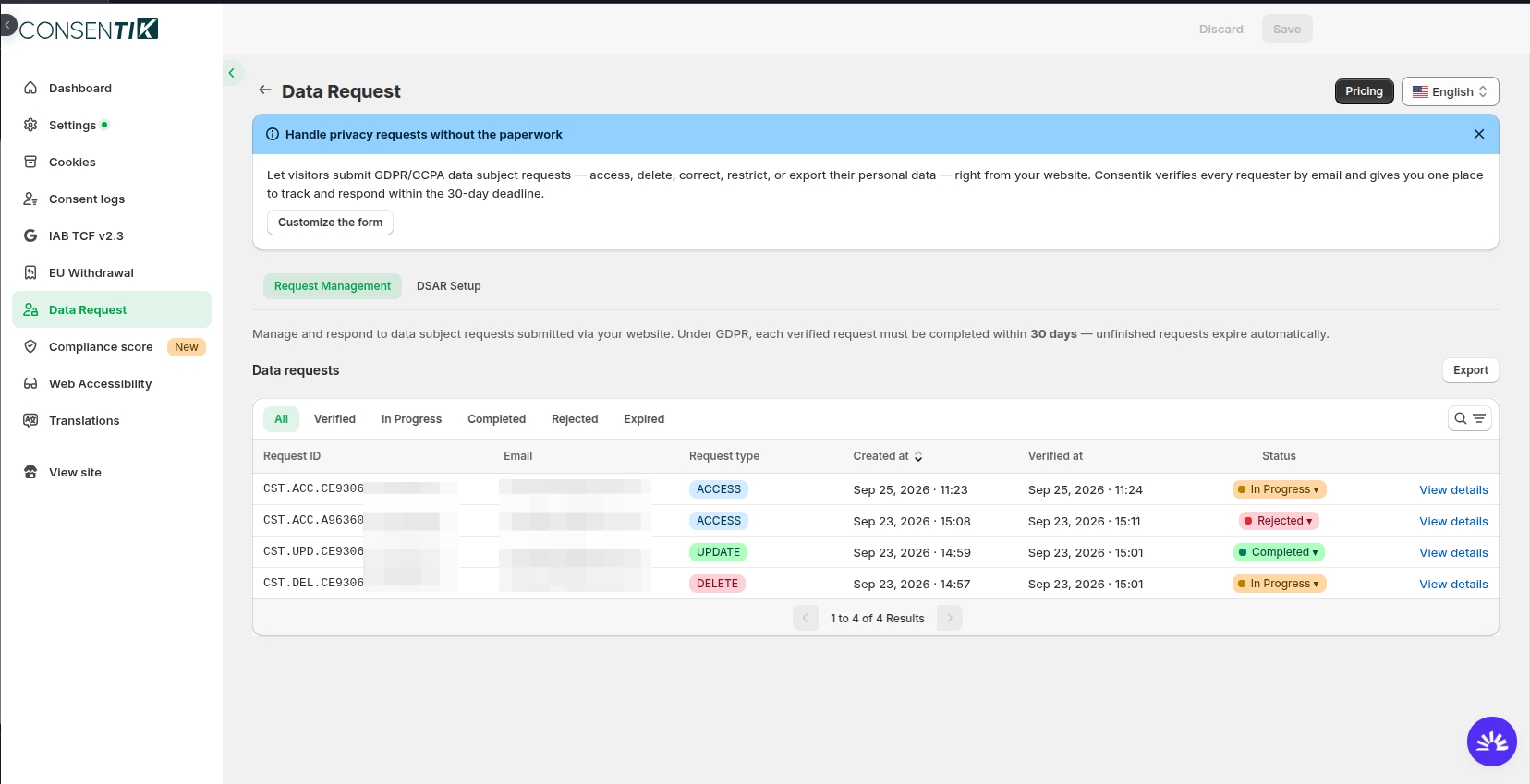
Manage and Resolve in Request Management: Track open tickets under the Request Management tab. Filter by status (Verified, In Progress, Completed, Rejected, or Expired), work through the internal checklist, add internal notes, and send the final response directly to your customer.
Availability & Next Steps
The Data Requests (DSAR) feature is available on the Advanced plan of Consentik for Wix. Merchants on other plans can explore all configuration options and email templates in read-only mode prior to upgrading.
Start Managing GDPR & CCPA Data Requests on Wix
Automate data subject access requests with built-in email verification, unique tracking IDs, and an automated 30-day compliance deadline countdown.