Having an active cookie banner on your Shopify store does not automatically mean your store is legally compliant. Privacy regulations vary significantly around the world: the EU and UK require explicit opt-in consent before firing tracking scripts; US states mandate accessible opt-out mechanisms like “Do Not Sell or Share My Personal Information”; and notice-based jurisdictions such as Japan and Australia require clear transparency disclosures. A cookie setup that satisfies European standards can still fall short in California.
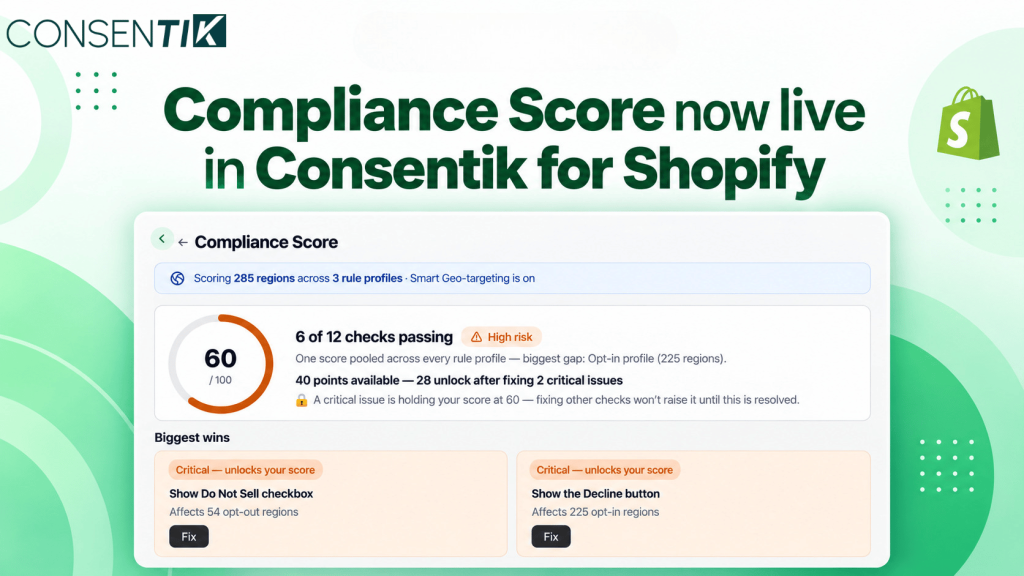
Until now, verifying whether your configuration satisfied every regional requirement required cross-referencing legal texts with your banner settings. Consentik’s new Compliance Score removes that guesswork. It evaluates your live cookie configuration on a 0–100 scale against privacy laws in 284+ regions and pinpoints exactly what to adjust first to keep your store protected.
Inside Consentik Compliance Score: Core Capabilities and Checks
Compliance Score evaluates your store’s cookie configuration against the three major privacy law frameworks simultaneously, ensuring your setup complies based on where each visitor is physically located.
Multi-Framework Evaluation Across 284+ Regions: Consentik pools your setup against three distinct legal profiles:
- Opt-in (225 regions): Applies to the EU/EEA, UK, and GDPR-style frameworks where consent is mandatory before tracking begins. Checks include script auto-blocking, a visible Decline button, and granular preference popups.
- Opt-out (53+ regions): Covers US states with comprehensive privacy laws (such as CCPA/CPRA). Checks verify the presence of “Do Not Sell or Share” controls and automatic honoring of the Global Privacy Control (GPC) signal.
- Notice (6 regions): Applies to countries like Japan, Australia, and New Zealand that mandate clear upfront disclosure. Checks verify privacy policy links and persistent re-open consent widgets.
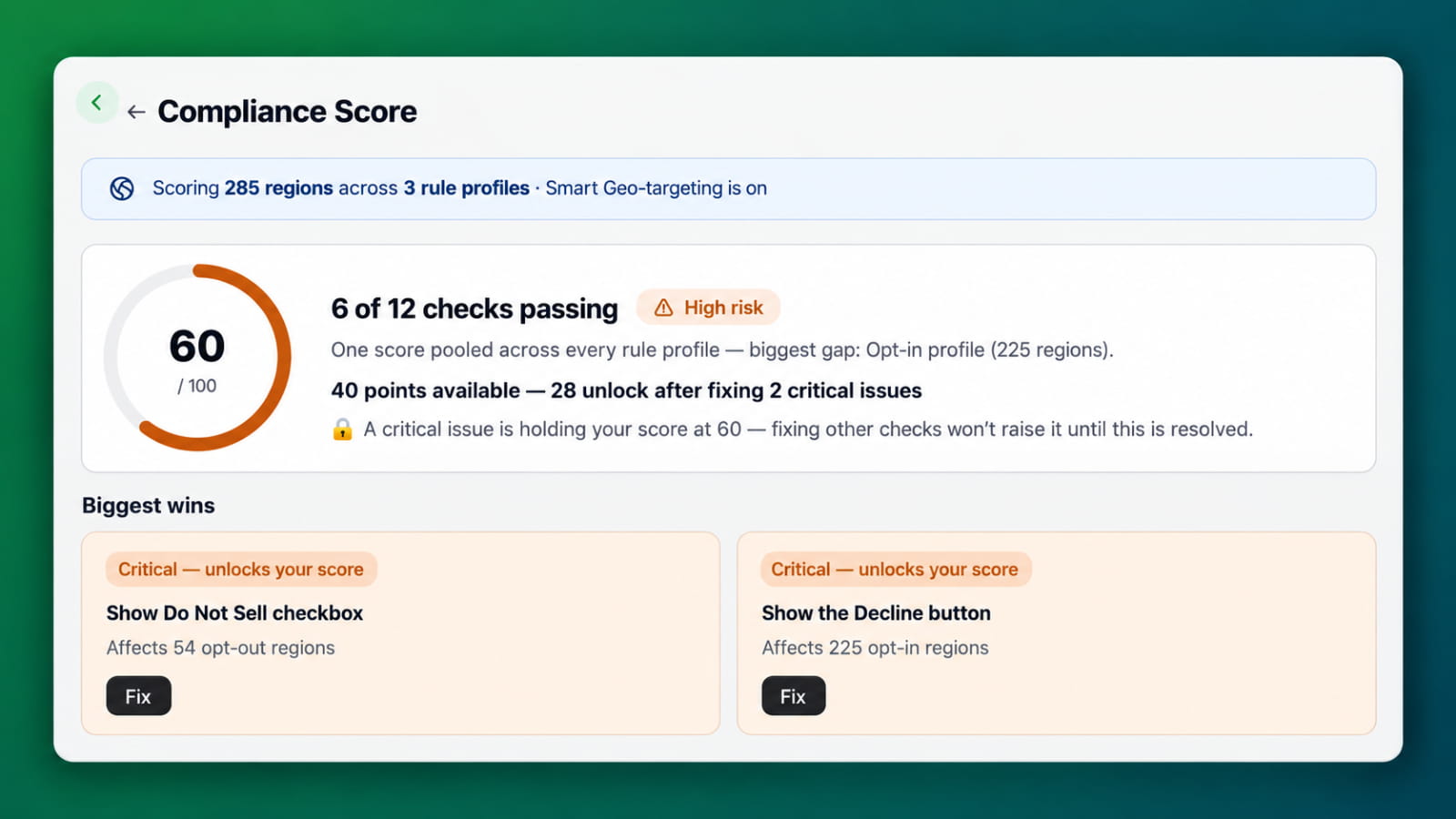
Transparent Risk Categorization: Your overall score places your store into one of three distinct risk tiers:
- Low Risk (Score 85–100): Your configuration satisfies core statutory requirements across target jurisdictions.
- Medium Risk (Score 60–84): Your setup covers basic requirements but has minor gaps, such as incomplete disclosure links or unconfigured preference drawers.
- High Risk (Score below 60 or failing critical checks): Visitors cannot properly refuse tracking in mandatory jurisdictions, exposing your store to compliance violations.
Locked Scores on Critical Checks: Non-critical issues (such as a missing cookie category description) reduce point totals gradually, but critical checks function as hard gates. If your site fails to auto-block scripts prior to consent, omits a Decline button in an opt-in region, or fails to honor GPC signals, your overall score locks. Resolving secondary settings will not lift your score until these non-negotiable protections are in place.
Prioritized “Biggest Wins” Engine: Instead of combing through lengthy compliance audits, the app ranks unresolved issues by business impact. Critical blockers are presented first, accompanied by the exact number of jurisdictions affected (e.g., “Affects 225 opt-in regions”).
One-Click Deep-Linked Fixes: Every failing item features a direct Fix action that routes you to the exact tab and card in your Consentik admin. For standard configuration settings, Fix all issues lets you apply safe default toggles in a single click.
Contextual Audit Logic: The checks list adapts dynamically to your storefront stack. If your store integrates Google Analytics, Google Ads, or Google Tag Manager, Consentik automatically audits Google Consent Mode v2 and related privacy parameters. If no Google services are detected, those checks are marked as “Not required” so they do not artificially penalize your rating.
Audit-Proof Consent Logging: European regulations require merchants to maintain proof that consent was granted. Compliance Score verifies whether your active plan allows you to view and export consent audit trails. If you are on a free tier without log exports, the check flags an “Upgrade to fix” action to ensure your regulatory records remain defensible.
Why Multi-Region Privacy Compliance Matters for Shopify Merchants
Maintaining multi-region cookie compliance directly protects your business operations, advertising tracking pipelines, and customer acquisition channels.
- Eliminating Regulatory and Platform Exposure: Global privacy authorities penalize tracking that fires prior to consent or platforms that withhold opt-out mechanisms. By identifying and resolving critical blockers early, you maintain full compliance across both opt-in and opt-out jurisdictions without needing bespoke configurations for every market.
- Preserving Ad Attribution and Signal Quality: Correctly configuring Google Consent Mode v2 and region-based firing rules ensures that conversion modeling and behavioral tracking operate cleanly where legally permitted, preventing abrupt data blackouts in ad networks like Google Ads and Meta.
- Zero Guesswork and Immediate Validation: Real-time scoring eliminates the administrative overhead of auditing tracking scripts manually. The moment a toggle is saved, your dashboard recalculates the score and provides an immediate before-and-after update (e.g., “Compliance score updated: 60 → 96”).
How to Access and Optimize Your Shopify Compliance Score
Compliance Score is available immediately to all merchants directly within the Consentik application on Shopify.
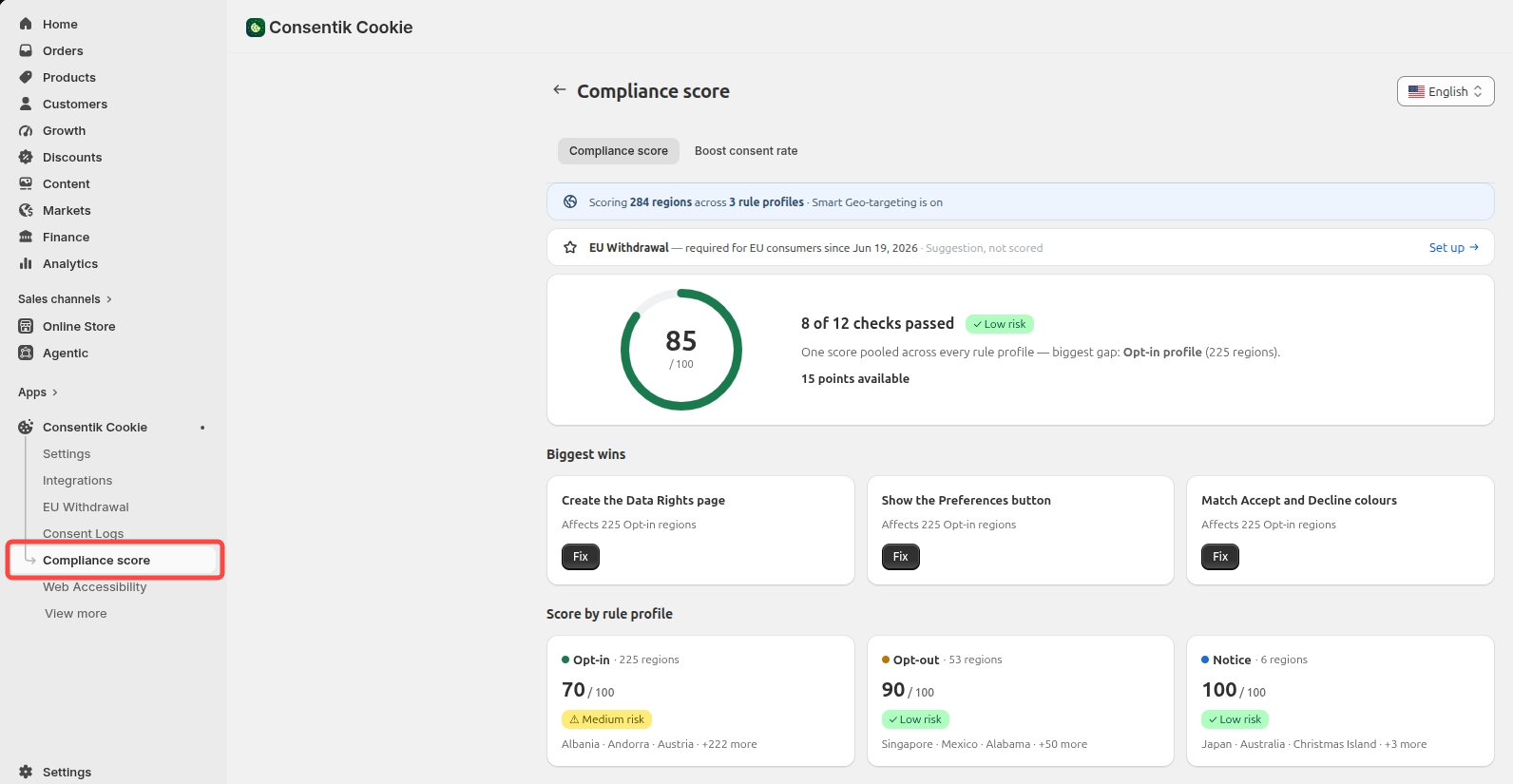
- Navigate to Compliance Score: Open your Consentik app admin in Shopify and select Compliance score from the left-hand navigation sidebar. You can also view your mini score card directly on your main Dashboard or Settings overview.
- Review Your Critical Checks and Biggest Wins: Examine your overall score ring and risk tier. If a 🔒 lock icon appears, review the Biggest wins card at the top to identify which critical checks are capping your score.
- Apply Targeted or Batch Fixes: Click the dark Fix button beside any flagged issue to navigate directly to the setting that requires adjustment, or select Fix all issues to resolve standard configuration checks simultaneously.
- Activate Smart Geo-Targeting for Instant Gains: If you are running a single banner across all markets, navigate to the top scope banner to review your estimated point increase. Enabling Smart Geo-targeting dynamically serves mode-specific banner behaviors (Opt-in, Opt-out, or Notice) based on visitor origin, instantly resolving region-specific conflicts and elevating typical configurations from high risk (60) to low risk (96+).
Read document here.
Ready to inspect your store’s privacy readiness? Open the Consentik Shopify App to review your Compliance Score, clear critical flags, and streamline your global cookie policies.
See Exactly Where Your Cookie Compliance Stands
Compliance Score – a live 0–100 audit of your cookie setup, benchmarked against privacy laws across all 284 regions your visitors come from
![Google Ads Privacy Policy: Understand The Remarketing Requirement [2026 Update]](https://consentik.com/wp-content/uploads/2026/04/google-ads-privacy-policy-150x150.png)