GDPR dark patterns are costing businesses hundreds of millions of euros in fines. Regulators didn’t invent a new rule to make this happen. They’re simply applying rules that have been on the books since 2018, and they’re doing it with more precision and force every year.
This guide breaks down what your product team, marketers, and compliance staff need to know. We’ll cover what dark patterns are, how they collide with GDPR and a growing pile of EU regulations, what the biggest enforcement cases actually look like, and how to check your own digital interfaces before a regulator does it for you.
What Are GDPR Dark Patterns?
Back in 2010, a British UX expert named Harry Brignull came up with the term “dark pattern.” He used it to describe website designs built to trick you into doing things you never planned to do. Maybe you buy insurance you didn’t want. Maybe you agree to share data without noticing. Or maybe you sign up for a subscription that’s almost impossible to cancel.

The European Data Protection Board, or EDPB, has its own take on this. It says dark patterns are designs that push people into bad choices about their personal data, choices they didn’t mean to make and didn’t want. The Digital Services Act, or DSA, sees it more broadly. It calls dark patterns any design that makes it harder for people to choose freely, whether the company did it on purpose or not.
Almost every official definition shares two ideas. First, the design tricks or mislead you. Second, it leaves you worse off. And here’s what catches a lot of teams off guard: you don’t need bad intent to be guilty. The California Privacy Protection Agency put it simply in a September 2024 advisory. Dark patterns are about effect, not intent. So you can mislead someone by accident and still break the law.
The Major Types of Dark Patterns
Regulators, researchers, and the EDPB have built out a full list of dark pattern types. If you run a digital business, you need to recognize them. These are the categories that come up most often and get penalized most heavily.
Overloading
The user gets buried under a pile of requests, notifications, and choices about their data until they give up and just click “agree.” Think of a cookie banner that lists dozens of vendor purposes, or a privacy flow that makes you scroll through 50-plus options before you can opt out of tracking.
Skipping
The layout is built to make you miss something important about how your data gets used. The classic move is putting a bright, easy-to-find “Accept All” button right in your face, while the “Manage Settings” or “Reject All” option sits in small, grey, easy-to-ignore text. This exact trick led to Google’s €150 million fine.
Stirring
This one uses your emotions against you. It shows up in two main ways.
- Confirmshaming writes the “no” option so it makes you feel guilty. You’ve seen buttons like “No thanks, I don’t want to save money” or “I prefer to miss out.”
- False urgency throws fake countdown timers or “only 2 left!” warnings at you to rush your decision, even though none of it is real.
Hindering
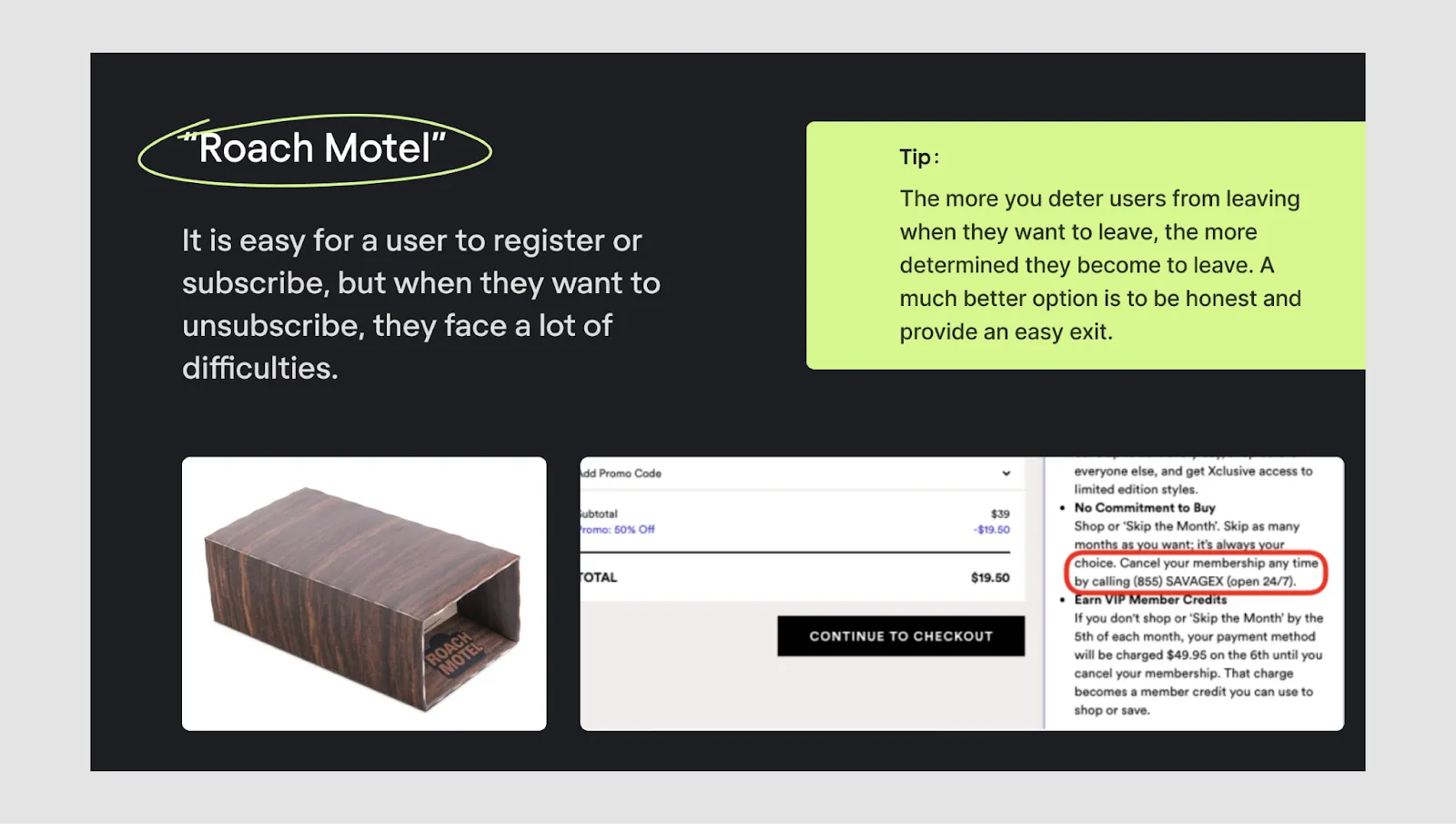
People also call this the Roach Motel. Getting in is easy. Getting out is a nightmare. Signing up takes 30 seconds, but cancelling means digging through buried settings, calling support, or fighting your way through a multi-step retention flow. The EDPB flags this as a clear GDPR violation, since the law says consent must be as easy to withdraw as it is to give.
Fickle
This is an inconsistent or confusing design that makes it hard to understand or control your data. Toggle switches might be labeled in opposite directions on different screens. Or “on” might mean one thing here and something else over there.
Left in the Dark
These interfaces hide information on purpose. They tuck opt-out options into deep submenus or present privacy controls in a way that leaves you genuinely unsure what you just agreed to.
Privacy Zuckering
Named after Facebook’s founder, this pattern tricks people into sharing far more data than they meant to. It usually works through confusing permission screens, misleading toggles, or bundled consents that tie data sharing to a service you actually need.
Drip Pricing
This is when a business advertises one price but hides mandatory fees until the very end of checkout, after you’ve already put in the time to buy.
Why GDPR Bans Dark Patterns?
Here’s something interesting. The GDPR never once uses the phrase “dark patterns.” Yet several of its core principles and articles directly forbid what dark patterns do.
Article 5(1)(a) – Lawfulness, Fairness, and Transparency. You have to handle data in a way that’s lawful, fair, and easy to understand. If your design hides what people are agreeing to, or pushes them into a “yes” they’d never give on their own, you’ve broken the fairness rule right there.
Article 7 – Conditions for Consent. People have to give consent freely. They need to know exactly what they’re agreeing to, and there can be no confusion about it. On top of that, saying “no” later has to be as easy as saying “yes” was. Pre-ticked boxes, unfair button design, and cancellation flows you can’t escape all break this rule.
Article 12 – Transparent Communication. Information has to be short, clear, and easy to find. If you bury privacy details in long documents, hide behind legal jargon, or make people click through screen after screen to reach their settings, you’re breaking this rule.
Article 25 – Data Protection by Design and Default. You have to design with privacy in mind from day one. The privacy-friendly choice, not the data-hungry one, should be the default. Pre-checked tracking boxes and settings that default to maximum sharing break this rule directly.
Other Laws You Need to Follow
GDPR isn’t the only law companies have to satisfy. By one count, 101 EU laws related to digitalization had been adopted, with 24 more in process or in the planning stages at the end of the 2019-2024 legislative term. Regulators themselves call it a fragmented but mutually reinforcing framework.
| Regulation | Key Provision |
| GDPR (2016) | Articles 5, 7, 12, 25: consent, fairness, transparency, privacy by design |
| ePrivacy Directive | Requires prior consent for non-essential cookies at the GDPR standard |
| Digital Services Act (DSA, 2022) | Article 25 directly bans dark patterns on online platforms |
| Digital Markets Act (DMA, 2022) | Targets gatekeepers’ anti-competitive practices, including limits on combining users’ personal data across services without valid consent; fines can reach up to 10% of global turnover |
| Unfair Commercial Practices Directive (UCPD) | Article 6 (misleading actions), Article 7 (misleading omissions) |
| AI Act (2024) | Bans subliminal, manipulative, or deceptive techniques, including those that exploit age or disability |
| Data Act (2023) | Recital 38 bans dark patterns in data-sharing interfaces |
There’s more coming. The European Commission has announced a Digital Fairness Act, or DFA, for the fourth quarter of 2026. It will tackle dark patterns, addictive design, misleading influencer marketing, and unfair personalization, with special attention to protecting minors. It should close the gaps in today’s patchwork and, for the first time, write a single agreed-upon definition of dark patterns into EU law.
Real Enforcement Cases: What Dark Patterns Cost
There’s a big gap between knowing about dark patterns and actually fixing them. That gap is where the financial risk lives. The cases below prove these aren’t hypothetical worries.
Google – €150 Million (CNIL, France, 2022)
France’s data protection authority, the CNIL, fined Google €150 million. The penalty split between Google LLC at €90 million and Google Ireland Limited at €60 million. The reason was one simple dark pattern: accepting all cookies was far easier than rejecting them. Google offered a one-click “Accept All” button, but refusing cookies meant clicking through extra steps and sub-pages. The CNIL ruled this broke the rule that consent must be as easy to withdraw as to give. Google had three months to fix it or face a daily penalty of €100,000.
Facebook (Meta) – €60 Million (CNIL, France, 2022)
The same investigation that snagged Google also caught Facebook doing the exact same thing. One click to accept, no matching one click to reject. The CNIL made it clear that this lopsided button design, one of the most common cookie banner tricks out there, is a GDPR violation rather than a design choice.
LinkedIn – €310 Million (Irish DPC, 2024)
In October 2024, Ireland’s Data Protection Commission fined LinkedIn €310 million after a two-year investigation. A complaint from the French nonprofit La Quadrature du Net kicked it off. The DPC found that LinkedIn’s consent for behavioral analysis and targeted advertising wasn’t freely given, specific, informed, or unambiguous. Those are the four requirements for valid GDPR consent, and the ruling said LinkedIn failed all of them. The DPC also rejected LinkedIn’s argument that the processing was necessary for its service, ruling that targeted advertising was not part of the platform’s core purpose. The penalty ranked among the largest GDPR fines ever issued.
The Pattern Behind the Fines
Look across these cases and the wider body of GDPR enforcement, and one thread stands out. The GDPR Enforcement Tracker now records 3,186 enforcement actions. Invalid cookie consent remains one of the most common and most expensive violations, especially when companies fire up tracking technology without clear, balanced choices for users. Combined GDPR fines for 2024 and 2025 topped €1.2 billion, and enforcement is speeding up, not slowing down.
How a Consent Management Platform Helps
By now, one thing is clear. Most of the fines we’ve covered didn’t come from companies trying to be sneaky. They came from cookie banners and consent flows that quietly broke the rules. Maybe the “Reject All” button took too many clicks. Maybe a tracking box was pre-checked. Maybe nobody on the team noticed that “accept” and “reject” had to look equally easy. These are small design choices, but they’re exactly what regulators look at.
Getting all of this right by hand is tough. You have to:
- Build a banner that follows GDPR, CCPA, and other laws at once.
- Keep your analytics and ads working while respecting each visitor’s choice.
- Track and store every consent choice, in case a regulator asks for proof.
- And plenty more stuff to do.
Miss one piece, and you face the same risk that hit Google, Facebook, and LinkedIn. For a small store owner or a busy team, that’s a heavy load.
This is why many businesses use a Consent Management Platform, or CMP, instead of building it all themselves. A CMP handles the parts that are easy to get wrong. It shows a compliant cookie banner, records what each visitor chose, and keeps that record ready if anyone needs to see it.
Tools like Consentik are built around the exact rules we’ve discussed. With one, you can:
- A customizable cookie banner. Build a consent banner that follows your local privacy laws and works with Google Consent Mode V2. You control how it looks, so it fits your store and stays compliant.
- A website compliance scanner. Scan your site to find privacy issues, then get clear guidance on how to fix them before a regulator finds them first.
- Advanced Google Consent Mode. Keep your analytics and ad measurement accurate while still respecting what each visitor chose.
- Automated consent management. Track, store, and manage user consent data in real time, so you always have proof on hand.
- Seamless integrations. Connect with tools like Google Consent Mode V2, Web Pixel, Sklik, and Microsoft UET. It also supports Shopify, Wix and WordPress headless stores.
For many merchants, that kind of automation takes a real load off the team and cuts down on the small mistakes that lead to fines. One caveat: a CMP won’t make your whole site compliant on its own. You still need honest design across your checkout, subscriptions, and settings. But for the consent layer itself, it removes a lot of the guesswork.
The EDPB’s Dark Patterns Guidelines: What They Actually Require
In February 2023, the EDPB released the final version of its guidelines, called “Deceptive Design Patterns in Social Media Platform Interfaces: How to Recognise and Avoid Them.” It was written for social media, but regulators now apply its rules to every kind of digital design.
The EDPB grouped dark patterns into the six types we covered earlier: Overloading, Skipping, Stirring, Hindering, Fickle, and Left in the Dark. Then it gave clear, practical rules for each step of the user’s journey.
When people sign up and give consent:
- “No” should be the starting point. That means no pre-ticked boxes.
- You can’t pre-select data-hungry options or make them stand out.
- Every choice has to look equally important.
For privacy settings and dashboards:
- Give people one main place to manage all their privacy choices.
- Turning consent off has to be just as easy as turning it on, with the same number of steps.
- Use the same words and meanings everywhere.
For messages and notifications:
- If saying “no” means losing a feature, explain that plainly. Don’t use guilt or pressure.
- Tell people about data changes clearly and on time.
For visual design:
- Your design has to match GDPR’s transparency rules. Fake security badges, sneaky layouts, and manipulative colors are not allowed.
- Button size and color can’t make “accept” look easy and “reject” look hard.
Final Words: What Dark Pattern Compliance Requires?
To stay clear of GDPR dark patterns under GDPR and the broader EU framework, a digital interface has to check every one of these boxes:
- Consent symmetry. Rejecting data sharing is as easy, fast, and visible as accepting it.
- No pre-selection. No privacy-invasive option is pre-ticked or selected by default.
- Clear language. Consent screens use plain words that honestly describe what users are agreeing to.
- Easy withdrawal. Users can withdraw consent, cancel subscriptions, or delete accounts in the same number of steps it took to sign up.
- Honest urgency. Scarcity and time-pressure claims are factually true.
- No emotional manipulation. Opt-out language doesn’t use guilt, shame, or fear.
- Visible rights. Privacy settings, data requests, and deletion options are easy to find, not hidden in submenus.
- Documented compliance. You can prove all of the above to a regulator with records, screenshots, and legal review logs.
The standard isn’t perfection. It’s honesty. GDPR and its companion regulations don’t stop businesses from collecting data or persuading users. They stop businesses from manipulating people into choices they never actually wanted to make.