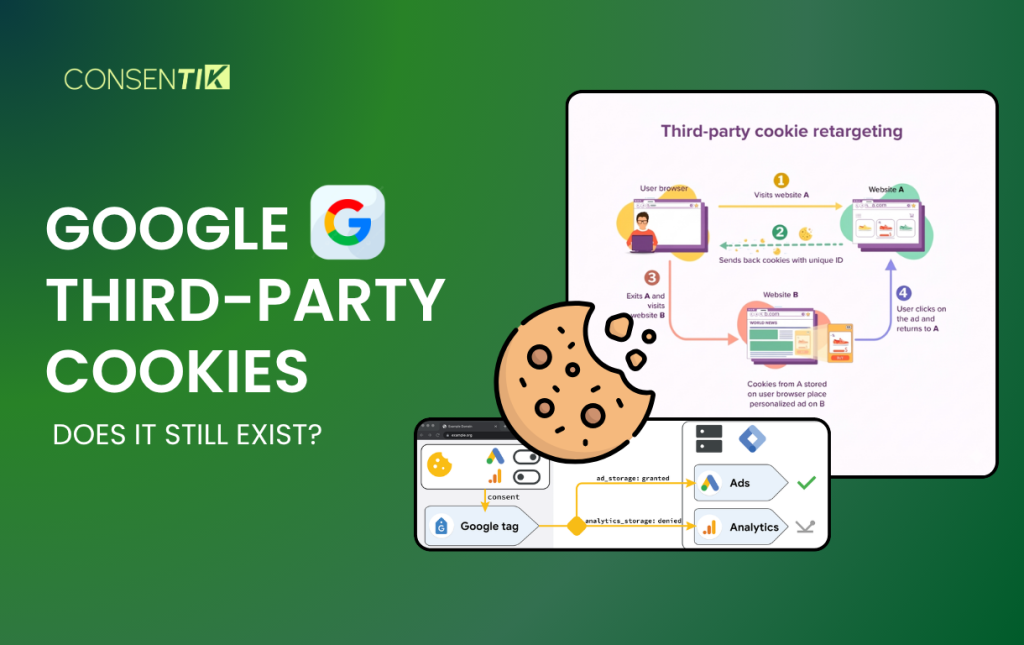
For years, Google third-party cookies powered almost everything you saw online – the ads that followed you around, the personalized homepage recommendations, the retargeting campaigns that reminded you about that shopping cart you abandoned. Then Google announced it was ending them. Then it was delayed. Then it reversed course.
If you’re confused about where things actually stand in 2026, you’re not alone. This article breaks it all down – what third-party cookies are, why Google wanted to remove them, what’s actually happening right now, and what you need to do to keep your ads and tracking running compliantly.
Here’s a quick overview before we go deeper:
- Google began phasing out third-party cookies in Chrome starting in early 2024, initially restricting them for 1% of users as a test. But a full removal never followed. As of 2026, Chrome has not eliminated third-party cookies by default.
- Consent is still required – no matter what Chrome does. Legal requirements under GDPR, ePrivacy, and other laws mean you can’t track users without explicit permission.
- Google’s Privacy Sandbox was the proposed replacement for third-party cookies. Most of the major APIs have since been retired (October 2025).
- Your preparation steps should focus on: auditing your cookies, setting up a certified CMP, implementing Consent Mode v2 correctly, and enabling Enhanced Conversions.
- The bottom line: The “cookieless world” is already here for large portions of your traffic – even if Chrome still allows cookies. Safari, Firefox, and Brave have been blocking third-party cookies for years.
What Are Google Third-Party Cookies?
Third-party cookies are cookies set by a domain different from the website you’re currently visiting. Say you’re browsing an online store – if that store has a Google Ads tag or an analytics tool embedded on the page, those tools can place cookies in your browser from their own domain. That cookie then follows you to other sites using the same network, quietly tracking your behavior across the web.
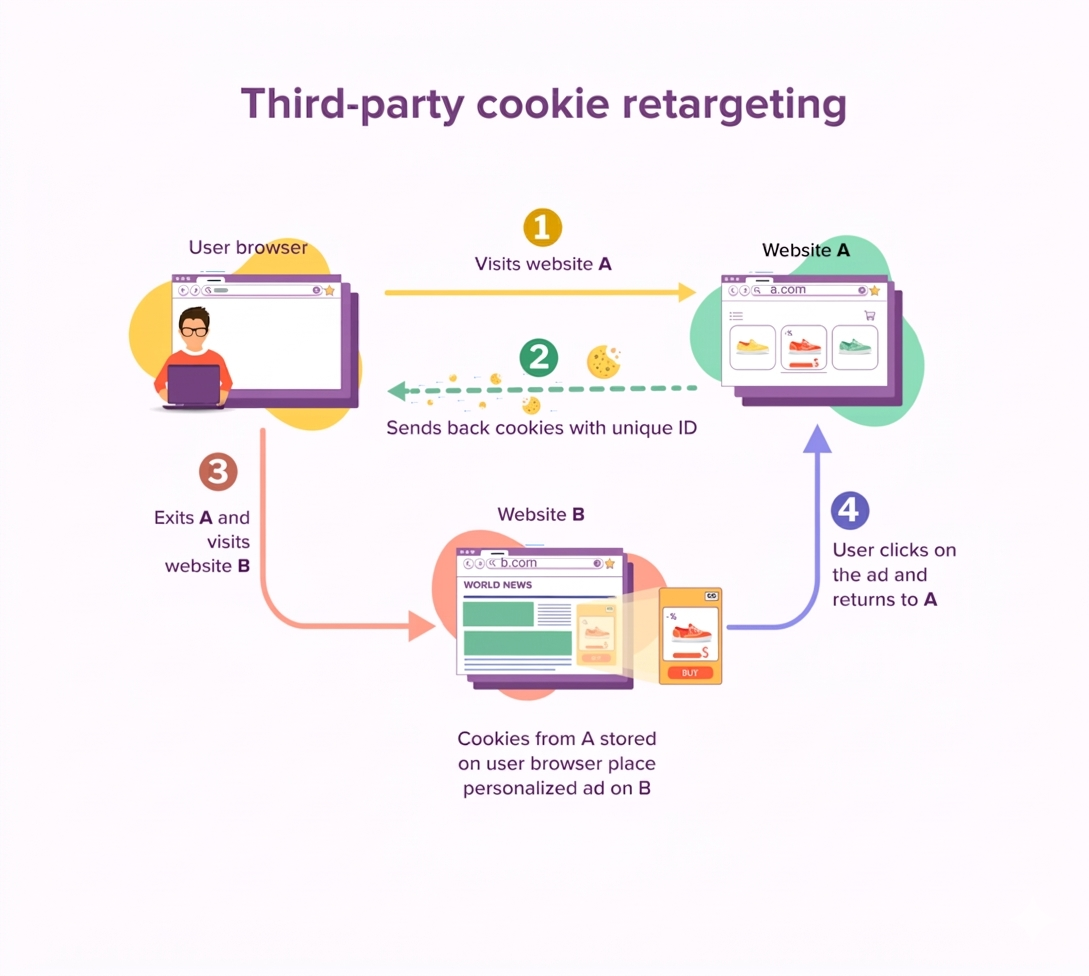
That cross-site tracking is exactly what privacy regulators – and now browsers – have been pushing back against. Google third-party cookies power a wide range of tools:
- Analytics platforms – tracking visits, sessions, and behavior across multiple sites
- Marketing and advertising platforms – showing targeted ads based on past browsing
- Social media integrations – tracking engagement with embedded share buttons or login features
- Personalized advertising – serving ads based on detailed behavioral profiles
For advertisers, third-party cookies were the backbone of digital marketing for decades. For users, they meant being tracked across every website they visited – often without realizing it.
Why Are Third-Party Cookies Under Scrutiny?
Data Collection Without Consent
Third-party cookies don’t just track which pages you visited. They collect your browsing history across hundreds of websites, spot patterns in your behavior, and infer details about you – like your interests, income level, or health concerns. All of this happens silently, with no clear notice to the user.
Most people had no idea it was going on. That’s the core issue regulators and privacy advocates have been raising for years.
User Profiling
All that data gets used to build detailed profiles. Ad tech companies can accumulate thousands of data points on a single user – and use them to make educated guesses about things like your relationship status, political views, or medical history.
The result? You search for information about a health condition once, and suddenly you’re seeing related ads on every site you visit. No explanation. No opt-in. Just ads that know a little too much.
The AdTech Ecosystem
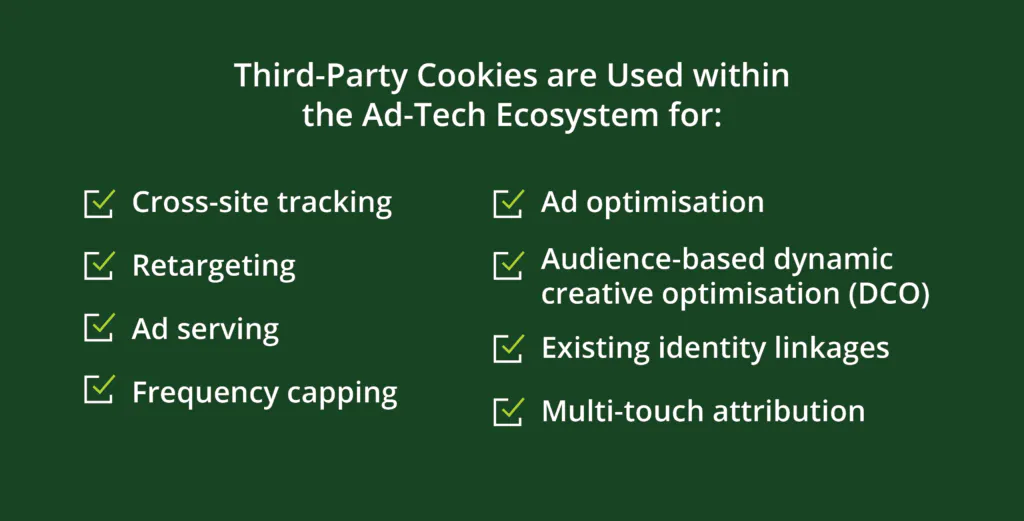
Behind the scenes, this data powers a huge industry. Every time a webpage loads, ad space is auctioned off in real time – in milliseconds – through a process called real-time bidding (RTB). Advertisers bid based on who you are, and third-party cookies are how they know.
So when Google announced it was removing them, the advertising world paid close attention. A lot of money runs through these tiny files.
Why Is Google Removing Third-Party Cookies?
The Initial Announcement
In 2020, Google announced it would stop supporting third-party cookies in Chrome – with a two-year timeline to make it happen. The reasons were simple: users expected more privacy, regulators were pushing harder on data collection, and Google wanted to act before it was forced to.
The news shook the advertising industry. Chrome holds about two-thirds of the global browser market. Removing third-party cookies from Chrome meant changing how digital advertising works at its core.
Privacy Sandbox Initiative

To replace third-party cookies, Google launched the Privacy Sandbox – a collection of new browser tools designed to keep advertising working without cross-site tracking. The goals were:
- Privacy-first advertising that doesn’t expose individual users
- No tracking of users across different websites
- Better fraud prevention
- More transparency for users
The idea was to move the work inside the browser. Instead of ad networks collecting your data from across the web, your browser would handle the targeting – and share only what’s necessary, nothing more.
Timeline Changes and Delays
The 2022 deadline came and went. Then the new deadline slipped too. The phase-out got pushed to 2023, then to late 2024.
In July 2024, Google shifted direction again. Rather than removing third-party cookies entirely, it proposed letting Chrome users make an informed choice about cross-site tracking. By April 2025, Google confirmed it wouldn’t even do that – third-party cookie controls would stay in Chrome’s existing settings, with no forced changes.
Then in October 2025, Google announced it was retiring most of the Privacy Sandbox APIs it had spent years building – including Topics API, Protected Audience, and Attribution Reporting API. Low adoption and pushback from the industry were cited as the reasons.
Five years of announcements, delays, and U-turns later: Chrome still has third-party cookies, and the replacement plan is mostly gone.
Industry Reaction
Reactions to Google’s original announcement ranged from alarm to skepticism. Advertisers worried about losing targeting capabilities. Agencies had to rethink how they measure campaign results.
Some critics raised a different concern: that Google’s plan would quietly strengthen Google’s own position. Google has enormous amounts of first-party data through Search, YouTube, Gmail, and Maps – data its competitors simply don’t have. The UK’s Competition and Markets Authority (CMA) opened an investigation into exactly this concern, which added pressure and contributed to the delays.
Other Browsers Already Block Them
Here’s something that often gets missed in the Chrome conversation: Safari and Firefox have been blocking third-party cookies for years.
Apple’s Safari reached full third-party cookie blocking in 2020 through its Intelligent Tracking Prevention (ITP) feature. Firefox enabled default blocking of third-party tracking cookies in 2019. Brave blocks them out of the box as a core privacy feature.
That means a meaningful share of your website traffic is already cookieless – today, regardless of anything Chrome does. If you’re waiting on Chrome to act before preparing, you’re already behind.
If Third-Party Cookies Are Going Away, Do Websites Still Need Consent?
Consent Is Still Required
Yes – absolutely. Removing third-party cookies doesn’t remove the need for consent. Tracking doesn’t stop just because cookies change. Other technologies – fingerprinting, local storage, pixels, session recording – continue to collect user data. Consent rules apply to all of them.
Legal Requirements
Multiple laws around the world require explicit user consent before tracking:
- GDPR (EU) – requires a lawful basis for processing personal data; for most tracking, that basis is consent
- ePrivacy Directive (EU) – Article 5(3) specifically requires consent before storing or accessing information on a user’s device
- LGPD (Brazil) – similar consent requirements for data processing
- UK PECR and DPA 2018 – require consent for non-essential cookies and tracking in the UK
- Various US state laws – including CCPA/CPRA in California, with growing adoption across other states
The European Data Protection Board’s 2024 guidelines reinforced that these rules are technology-neutral. They apply to cookies, pixels, URL parameters, fingerprinting, and other tracking methods. You can’t swap one technology for another and avoid the requirement.
Website Obligations
If you run a website that uses any non-essential tracking, you must:
- Obtain clear, explicit consent before those tools fire
- Tell users who is collecting data, for what purpose, and for how long
- Give users a genuine way to say no – including through a real “Reject All” option
- Store a record of each user’s consent
- Honor withdrawal of consent immediately
A buried checkbox or a banner with only an “Accept” button doesn’t meet the standard in most jurisdictions.
User Rights
Under GDPR and similar laws, users have real rights when it comes to their data. They can:
- Withdraw consent at any time without penalty
- Request access to what data has been collected about them
- Ask for their data to be deleted
Your consent management setup needs to support all of these. It’s not just about the banner – it’s about the full lifecycle of consent.
Consent is the core of privacy compliance – and that doesn’t change regardless of what Google does with cookies. Even in a fully cookieless world, you’d still need a proper consent framework for every other form of tracking on your site.
Consent and Google Ads & Analytics Platforms
Why Consent Matters More Than Ever
Two things are pushing consent up the priority list for every advertiser. First, privacy laws keep expanding. More countries are passing them, existing ones are getting stricter, and enforcement is increasing. It’s no longer just a European issue.Second, the EU’s Digital Markets Act (DMA) added new obligations for large platforms – including how they handle consent for advertising. For Google, that’s meant tighter enforcement of its own policies across Ads, Analytics, and other products.
Google Consent Mode
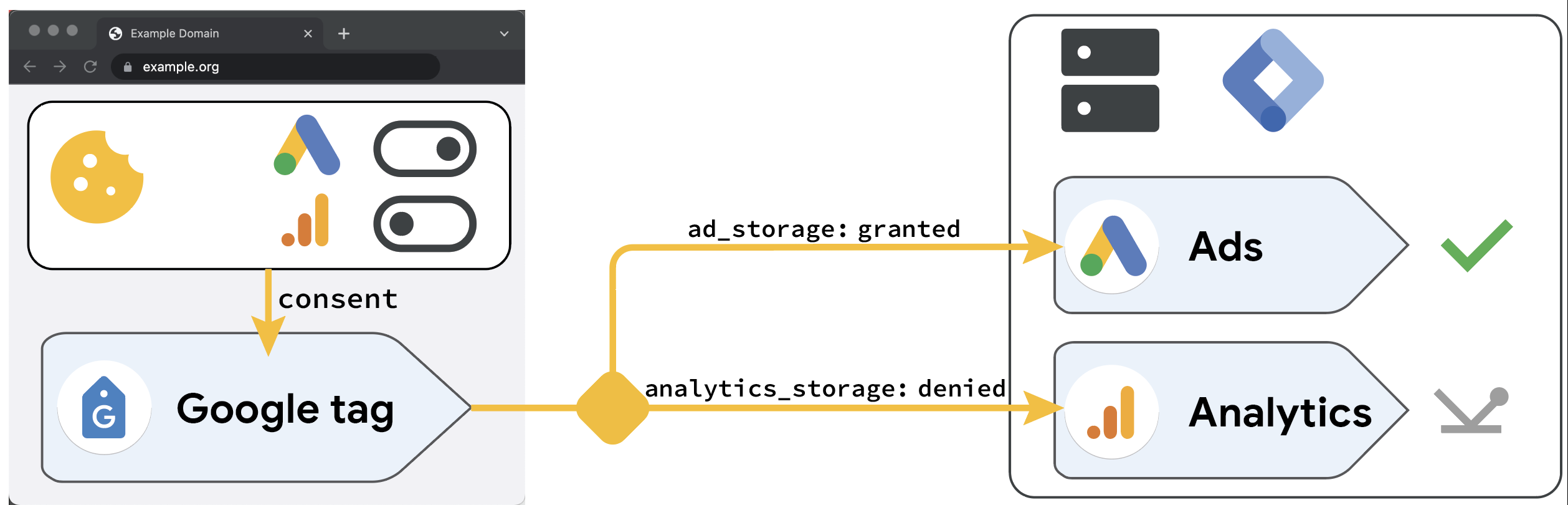
When a user declines cookies, what happens to your measurement data? Without a solution, you’d simply lose it. That’s the problem Google Consent Mode was built to solve.
Launched in 2020, Consent Mode works like this: if a user says no to cookies, Google doesn’t track them directly. Instead, it collects anonymized, aggregated signals – no personal data – and uses those to estimate what conversions likely happened. You don’t get perfect data, but you get a usable picture instead of a blank gap.
One thing worth being clear on: Consent Mode is not a cookie banner. Your banner is what asks users for consent. Consent Mode is what tells Google’s tags what the user decided. You need both – they work together, not instead of each other.
Google Consent Mode v2 (2023 Update)
In 2023, Google updated Consent Mode to version 2, adding two new required parameters for traffic from the EEA, UK, and Switzerland:
| Signal | What it controls |
| ad_storage | Whether advertising cookies can be used |
| analytics_storage | Whether analytics cookies can be used |
| ad_user_data | Whether user data can be sent to Google for ads |
| ad_personalization | Whether ads can be personalized for this user |
The first two existed in the original Consent Mode. The last two are new in v2 – and they’re required. If your implementation only passes ad_storage and analytics_storage, you’re running an incomplete setup. Features like enhanced conversions and tag-based conversion tracking require ad_user_data to function correctly.
CMP Requirement (2024 Onward)
If you use AdSense, Ad Manager, or AdMob, Google requires a certified Consent Management Platform (CMP). A basic cookie banner won’t cut it. Neither will a custom-built solution. The CMP has to be on Google’s approved list – no exceptions.
Critical update for 2026: Google required all publishers to move to TCF v2.3 by March 1, 2026. If you’re still on v2.2, your AdSense requests may show limited ads or get dropped altogether. Check with your CMP provider now if you’re not sure which version you’re on.
Technical Standard
The CMP also needs to integrate with the IAB Europe Transparency & Consent Framework (TCF). Think of TCF as a shared language between your website, your CMP, and ad tech vendors like Google. Without it, your CMP can’t pass consent signals in a format Google’s systems understand – which means your consent setup isn’t actually working the way it should.
Here’s the rewritten section:
What Is Replacing Google Third-Party Cookies in Chrome?
Privacy Sandbox Technologies
When Google first announced the removal of third-party cookies, it introduced the Privacy Sandbox – a set of browser tools meant to keep advertising running without cross-site tracking. Here’s what each one was designed to do:
- Topics API – Your browser looks at your recent browsing history and picks a few broad interest categories, like “sports” or “cooking.” It shares only that label with advertisers. No specific sites. No individual behavior.
- Protected Audience API – Lets advertisers run remarketing campaigns without tracking users across the web. Instead of a third-party server remembering who visited your site, the user’s own browser holds that information and runs the ad auction locally.
- Private State Tokens – Helps websites tell real users apart from bots. Not used for targeting – just fraud prevention.
- Attribution Reporting API – Tracks whether an ad click led to a purchase, without revealing which specific user converted. Advertisers get conversion data, but not at the individual level.
The Reality in 2026
In October 2025, Google announced it was retiring most of these APIs – including Topics, Protected Audience, and Attribution Reporting API. The reason? Low adoption. Most of the ad industry was never fully built around them.
The APIs that are sticking around – CHIPS, FedCM, and Private State Tokens – are mostly behind-the-scenes infrastructure. They’re not ad targeting tools.
The short version: don’t build your ad strategy around Privacy Sandbox APIs. Most of them are being phased out. Focus on what’s already working.
The Strategic Shift
Privacy Sandbox’s rise and fall points to one clear direction: first-party data is the future.
Advertising built on data you’ve collected directly from your own users – with their consent – is more reliable, more compliant, and harder to disrupt than anything that depends on tracking people across the web.
Preparing for Google’s Third-Party Cookie Changes With Consentik
Reading through everything above, you have a sense of what needs to happen: audit your cookies, get a certified CMP, set up Consent Mode v2, and stay compliant with GDPR, CCPA, and the rest.
Simple enough in theory. Much harder when you’re actually sitting in front of your website trying to make it work.
The tricky part? A broken consent setup doesn’t always show up as an error. You just quietly lose data – ads underperform, revenue dips – and by the time you notice, weeks of tracking are already gone.
That’s where Consentik comes in. Consentik is a Google CMP Partner and Microsoft-approved CMP built to take this off your plate. It handles the technical side – so you don’t have to become a compliance expert just to run a compliant store.
Here’s what you get:
- Customizable Cookie Banner – A consent banner that fits your brand and meets local privacy law requirements, fully compatible with Google Consent Mode V2 from day one.
- Website Compliance Scanner – Scans your site, flags compliance gaps, and tells you exactly what needs fixing. No manual digging required.
- Advanced Google Consent Mode – All four required signals (ad_storage, analytics_storage, ad_user_data, ad_personalization) are configured automatically, keeping your analytics and ad measurement accurate while respecting user choices.
- Consent Management Automation – User consent is tracked, stored, and updated in real time. No spreadsheets. No manual record-keeping.
- Seamless Integrations – Works with Google Consent Mode V2, Microsoft UET, Sklik, Web Pixel, and supports Shopify headless stores.
The bottom line: your store stays compliant with GDPR, CCPA, LGPD, and other global regulations – without breaking your marketing setup or cutting into your revenue.
Getting consent right doesn’t have to be a headache. Consentik handles the hard part so you can get back to running your business.
Your Tracking Breaks Without Proper Consent
Stay compliant with GDPR, Google Consent Mode v2, and TCF v2.3 — without losing conversion data or ad performance.
Google Third-Party Cookies FAQs
Are third-party cookies going away in Chrome?
Not anymore. Google reversed course – Chrome still has third-party cookies, and there’s no forced removal planned. That said, Chrome blocks them in Incognito mode, and Safari, Firefox, and Brave have blocked them by default for years. A good chunk of your traffic is already cookieless, regardless of what Chrome does.
Does my website use third-party cookies?
Most likely, yes. If you run Google Ads, Google Analytics, Meta Pixel, or any third-party chat or marketing tool, those scripts are probably setting third-party cookies on your site. Run a cookie scan to see exactly what’s there.
How do tracking cookies work?
When you visit a site, third-party scripts on that page – like ad tags or analytics tools – can drop a cookie in your browser from their own domain. That cookie holds a unique ID. When you visit another site using the same ad network, the network spots that ID and recognizes you. That’s how you get followed around the web by the same ads.
Are third-party cookies legal?
Yes, but only with proper consent. In the EU and UK, you need explicit permission before setting non-essential cookies. Using them for ads or analytics without consent breaks ePrivacy rules and GDPR. The rules have gotten stricter over time, not more relaxed.
What replaces third-party cookies?
There’s no single replacement. Most of Google’s Privacy Sandbox APIs have been retired. The practical path forward is: collect first-party data with consent, use Enhanced Conversions to recover measurement gaps, and consider server-side tagging for more control. It’s a different advertising approach – not a like-for-like swap.
How do I make my website GDPR-compliant for cookies?
Four steps: audit your cookies, set up a Google-certified CMP with TCF v2.3, make sure your banner includes a clear “Reject All” option, and implement Consent Mode v2 with all four signals. Non-essential cookies should not fire until the user has made a choice.
Final Thoughts
The back-and-forth around Google third-party cookies isn’t over – but waiting to see what happens next is the wrong move. Safari and Firefox already block them. Regulations already require consent. Google already enforces its own policies.
The groundwork you lay now – a proper CMP, Consent Mode v2, first-party data – is what keeps your ads and measurement running no matter what changes next. Start with the audit. The rest follows.