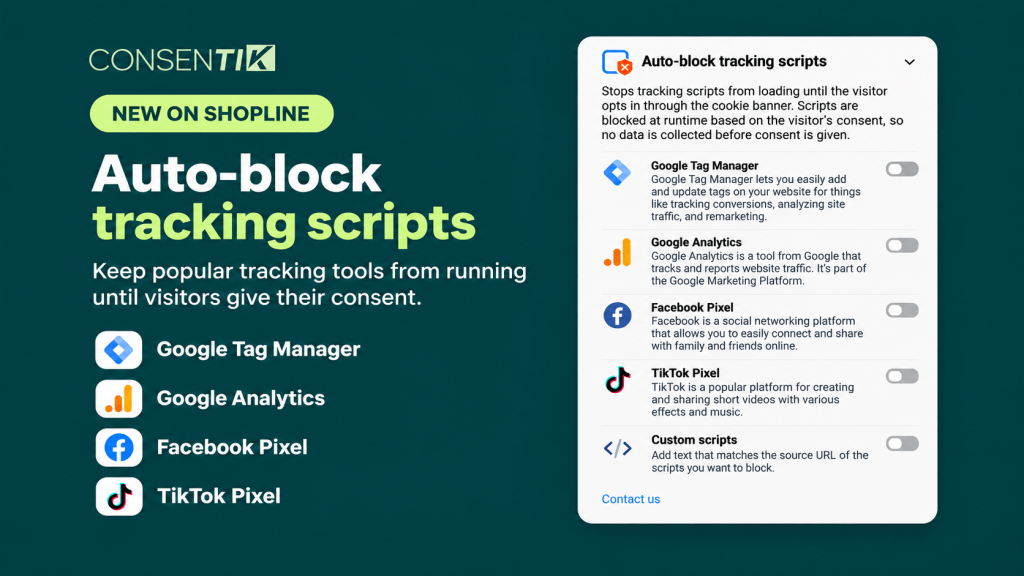
Maintaining full compliance with global privacy regulations like GDPR and CCPA is more critical than ever for e-commerce merchants. To help you protect customer data privacy effortlessly, we are excited to announce a major feature update for Consentik on Shopline: Auto-Block Tracking Scripts.
With this new release, Shopline merchants gain granular control over when tracking services execute, ensuring no third-party data collection happens without explicit visitor consent.Why Use Auto-Block Tracking Scripts on Your Shopline Store?
Modern privacy laws require that tracking tools (such as analytics and marketing pixels) remain inactive until store visitors explicitly opt in. Consentik’s Auto-Blocker feature automates this process without complex coding or manual script management. Key features and benefits include:- Selective Service Blocking: Easily toggle off non-essential scripts until user consent is given, including Google Analytics, Google Tag Manager (GTM), Facebook Pixel, and TikTok Pixel.
- Regulatory Compliance: Fully align your Shopline store’s data practices with strict GDPR, CCPA, and international data protection standards.
- Persistent User Preferences: Once a visitor sets their preferences on your cookie consent banner, Consentik remembers their choice via cookies. On future visits, their preferences apply automatically – ensuring a seamless, compliant customer experience.
How to Set Up Auto-Block Tracking Scripts in 4 Easy Steps
Activating tracking script blocking in your Shopline store takes only a few minutes:- Select Tracking Services: Open Consentik on your Shopline dashboard and choose the specific tracking services you want to block (e.g., Google Analytics, Facebook Pixel, TikTok Pixel, GTM).
- Generate Your Custom Code: The app will automatically build a customized code snippet based on your chosen tracking services. Copy this snippet to your clipboard.
- Paste into theme.liquid: Navigate to your current store theme’s layout files, open
theme.liquid, and dán (paste) the script directly underneath the opening<head>tag. - Save Changes: Save
theme.liquidto activate script blocking across your entire online store.
How Auto-Blocker Works for Store Visitors
When a new customer visits your Shopline store:- Default Blocking: All selected tracking scripts are paused by default before they can gather any personal user data.
- Consent Banner Display: A customizable cookie banner prompts the user to accept, reject, or customize tracking choices by category (e.g., Marketing or Analytics).
- Conditional Script Execution: If the user consents, Consentik immediately triggers the corresponding scripts. If they decline or choose specific categories, non-consented tracking scripts remain strictly blocked.
- Automated Memory: Consent settings are saved so returning customers will not be repeatedly prompted, while keeping their data preferences respected.