What Is Google Consent Mode?
Before comparing the two modes, it helps to understand what Google Consent Mode actually does.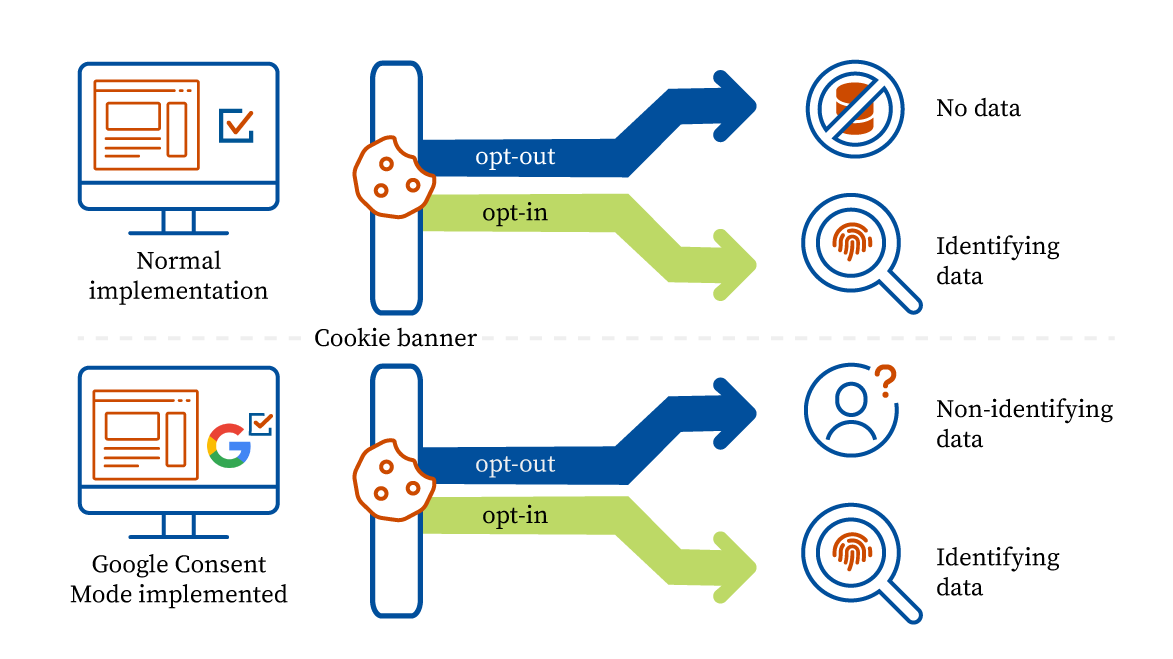 When a user visits your site, they’re shown a cookie consent banner. Depending on what they click – accept or reject – Google Consent Mode tells your Google tags (like Analytics and Google Ads) how to behave. It essentially acts as a bridge between your user’s privacy choices and your tracking setup.
Google Consent Mode v2 introduced four key consent signals:
When a user visits your site, they’re shown a cookie consent banner. Depending on what they click – accept or reject – Google Consent Mode tells your Google tags (like Analytics and Google Ads) how to behave. It essentially acts as a bridge between your user’s privacy choices and your tracking setup.
Google Consent Mode v2 introduced four key consent signals:
- analytics_storage – controls cookies used for analytics
- ad_storage – controls cookies used for advertising
- ad_user_data – controls whether user data is sent to Google for ad purposes
- ad_personalization – controls whether data is used for personalized ads
What Is Basic Google Consent Mode?
Basic Consent Mode takes a strict, all-or-nothing approach. Your Google tags don’t load at all until the user interacts with the consent banner.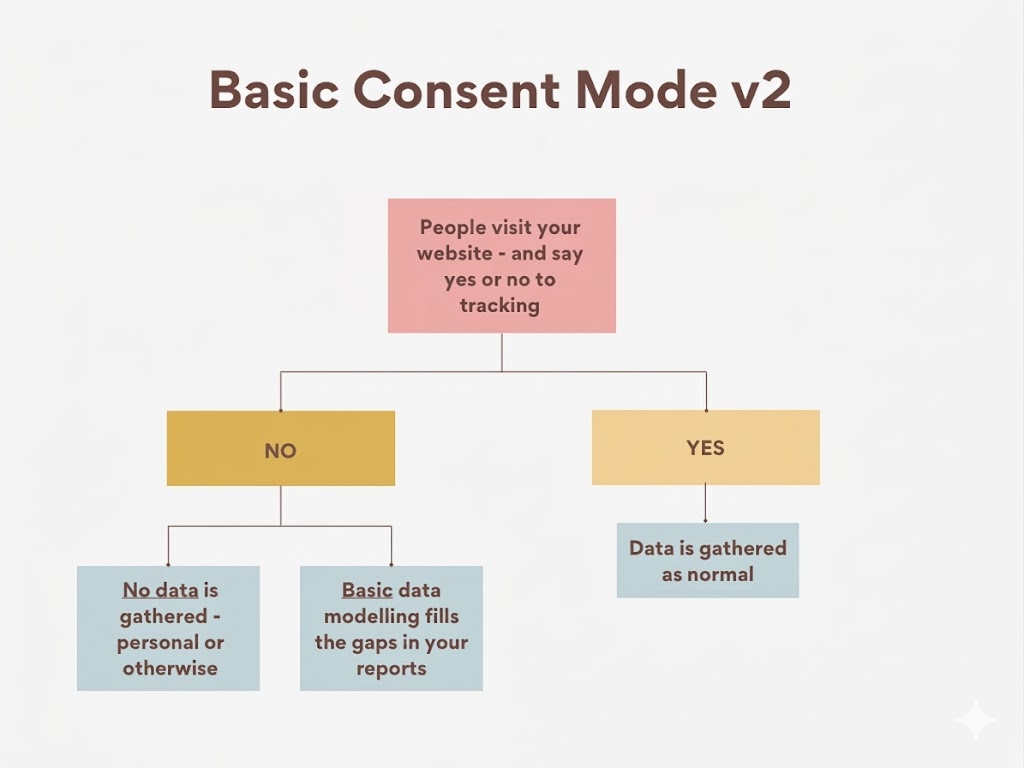 Here’s how it plays out in practice:
- Before consent is given: Your Google tags are completely blocked. No cookies are dropped, and nothing is sent to Google – not even an anonymous ping. The page loads, the banner appears, and everything waits.
- If the user accepts: The consent state switches to “granted,” and the tags load normally. Analytics and advertising tracking begins from that point forward.
- If the user rejects: The tags stay blocked. Google receives zero data from that visit. No analytics, no ad tracking – nothing.
Why Use Basic Mode?
Basic mode is the right choice if compliance is your top priority. It guarantees that no Google tracking runs without explicit consent, which ticks the box for GDPR and similar regulations. It’s also simple to set up – most Consent Management Platforms (CMPs) can handle it with minimal configuration. It works well for:- Small or informational websites with simple analytics needs
- Organizations with conservative legal requirements
- Teams without dedicated analytics or development resources
- Businesses just starting with consent management
The Trade-Off
The downside is data loss. If many users reject cookies, you lose all data from those visits. Google won’t know they even came to your site. Your ad conversion estimates will be based on general industry averages – not your actual traffic. Basic mode also turns off behavioral modeling in Google Analytics 4. That means users who say “no” to cookies become completely invisible in your reports. Here’s why that matters: in countries like Germany or France, over 30–40% of users reject cookies. For a small blog, that’s fine. But if you’re running paid ads and need accurate conversion data to manage your budget, losing that much data can seriously hurt your results.What Is Advanced Google Consent Mode?
Advanced Consent Mode works differently. Instead of blocking tags until consent is given, it lets them load immediately – but in a limited, privacy-safe mode.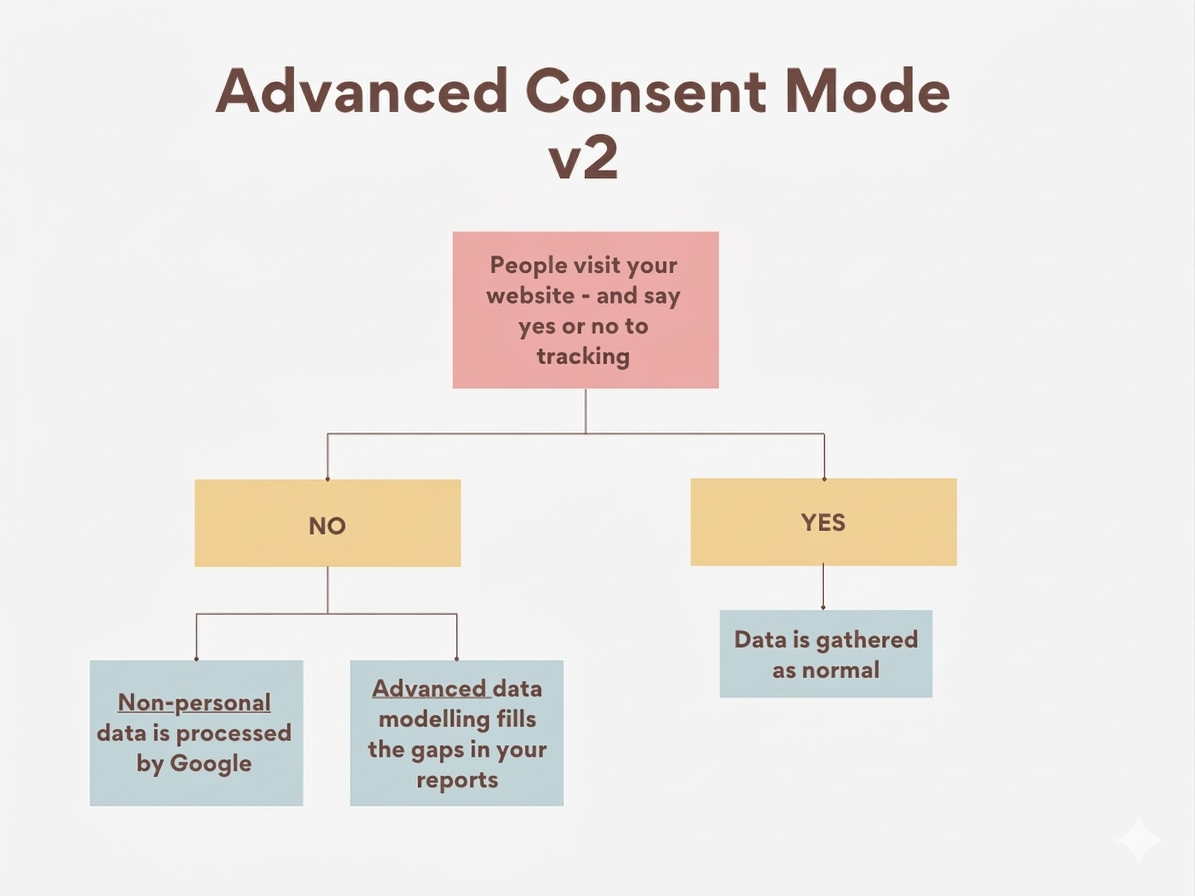 When a user first arrives on your site, the tags initialize with all consent signals set to “denied” by default. In this state, they don’t drop any cookies or collect any personal data. Instead, they send small, anonymous “pings” to Google’s servers. These pings carry very basic, non-identifiable information – things like the timestamp of the visit, the browser type, the page referrer, and whether an ad click led the user to your site.
No personal data. No user IDs. No cookies. Just anonymous signals.
When a user first arrives on your site, the tags initialize with all consent signals set to “denied” by default. In this state, they don’t drop any cookies or collect any personal data. Instead, they send small, anonymous “pings” to Google’s servers. These pings carry very basic, non-identifiable information – things like the timestamp of the visit, the browser type, the page referrer, and whether an ad click led the user to your site.
No personal data. No user IDs. No cookies. Just anonymous signals.
- If the user accepts: The tags switch to full tracking mode. Cookies are set, data flows normally, and everything works as expected.
- If the user rejects: The tags stay in restricted mode – sending only those anonymous pings, never accessing personal information.
Why Use Advanced Mode?
Those cookieless pings might seem minor, but they make a big difference for data quality. Google uses them to run advertiser-specific conversion modeling – a more precise form of data estimation that’s tailored to your actual traffic, not generic industry benchmarks. In Google Analytics 4, Advanced mode also enables behavioral modeling for non-consenting users. GA4 uses machine learning to fill in gaps in user journeys using those anonymous signals as input. You won’t see individual-level data for users who said no, but you’ll still get aggregate insights that paint a clearer picture. Advanced mode is a strong fit for:- Businesses running active Google Ads campaigns that need accurate conversion data
- Sites with a large EU audience where many users may decline cookies
- Organizations that want to offer granular consent options (e.g., allowing analytics but not ad personalization)
- Data-driven teams where losing 15–20% of analytics data has a real business impact
The Trade-Off
The downside is complexity. Advanced mode takes more work to set up. You’ll need to configure default consent states in Google Tag Manager, understand how consent signals work with your tags, and test everything carefully. If something is set up wrong, you could end up with missing data or tracking that fires when it shouldn’t. There’s also a legal grey area. Google built the anonymous pings to be privacy-safe, but some experts argue that even basic signals – like IP addresses or browser type – could count as personal data under strict GDPR rules. Most businesses use Advanced mode without problems, but if you operate in a heavily regulated region, it’s worth checking with a data protection advisor first. Lastly, Advanced mode needs more upkeep. Every time you add a new tag, update your CMP, or roll out a new Google feature, you’ll need to make sure your consent setup still works correctly. It’s not a huge task, but it’s not a “set it and forget it” solution like Basic mode.Basic vs Advanced Google Consent Mode Comparison
Here’s a direct comparison to make the differences easier to see:| Feature | Basic Consent Mode | Advanced Consent Mode |
| When tags load | Only after user grants consent | Immediately on page load (in restricted mode) |
| Data before consent | Nothing is sent to Google | Anonymous, cookieless pings are sent |
| Data after consent denied | No tracking whatsoever | Only anonymous pings continue; no cookies or personal data |
| Conversion modeling | Uses broad industry averages | Uses advertiser-specific modeling based on your traffic |
| GA4 behavioral modeling | Not available for non-consenting users | Available – GA4 can model behavior using anonymous signals |
| Setup complexity | Low – minimal configuration needed | Higher – requires tag manager setup and testing |
| Best for | Compliance-first, simpler sites | Data-driven businesses with active ad campaigns |
Basic vs Advanced Google Consent Mode, Which One Should You Choose?
There’s no universal answer – it depends on what matters most to your business. Choose Basic Consent Mode if:- Compliance is your number one concern. If your legal team wants the most conservative approach to GDPR, Basic mode delivers that. No tracking without explicit consent, full stop.
- You have a simple website with basic analytics needs. A brochure site, a small business landing page, or a blog with light traffic monitoring doesn’t need the complexity of Advanced mode. Basic will cover your needs without the overhead.
- You have limited technical resources. Basic mode works out of the box with most CMPs. No need for custom tag configurations or deep knowledge of Google Tag Manager.
- You’re just getting started. It’s completely reasonable to launch with Basic mode and upgrade later. Many businesses took this approach when Consent Mode v2 became mandatory in early 2024.
- You rely on Google Ads for growth. If ad performance, remarketing audiences, and accurate ROAS measurement matter to your business, Advanced mode helps maintain those signals even when users opt out of cookies.
- A large chunk of your traffic comes from Europe. In regions where cookie rejection rates are high, Advanced mode helps you recover data that Basic mode would lose entirely. The more users that say no, the more valuable those anonymous pings become.
- You want granular consent options. Advanced mode pairs well with CMPs that allow users to consent to some categories but not others. You can let users say yes to analytics but no to ad personalization, and your tags will adjust accordingly.
- You have the technical capacity to set it up correctly. Whether you have an in-house developer or use a robust CMP partner, Advanced mode is manageable – but only if it’s implemented properly.
How to Implement Google Consent Mode
Regardless of which mode you choose, implementation follows the same basic steps. Use a Consent Management Platform (CMP) Google Consent Mode doesn’t include a cookie banner. You need a CMP to show the banner to users, collect their choices, and send that information to Google’s tags. Google has a list of certified CMP partners that are tested to work correctly with Consent Mode v2. A certified CMP handles most of the technical setup for you – it already knows how to send the right signals (ad_storage, analytics_storage, ad_user_data, ad_personalization) to Google. If you serve users in the EU, a compliant CMP isn’t optional. Google’s policies require it for sites running analytics or ads targeting European users. Without one, you risk losing tracking data and potentially breaking local privacy laws. When picking a CMP, make sure it supports Consent Mode v2 (not just v1), works with both Basic and Advanced modes, and keeps audit logs for compliance. Bonus points if it comes with a ready-made Google Tag Manager template – that saves a lot of setup time. Configure Google Tag Manager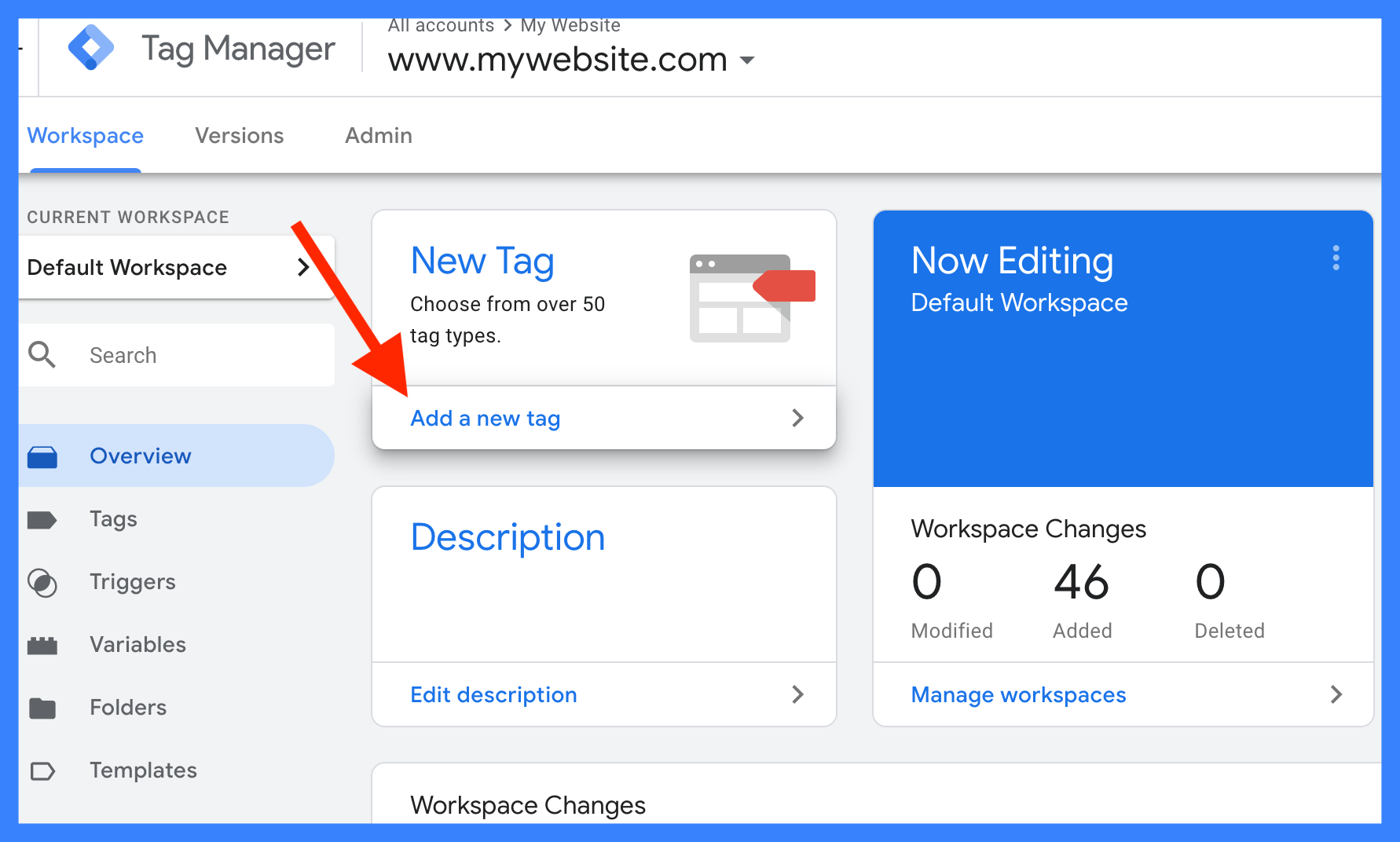 In GTM, enable Consent Mode in your container settings and check that all your tags are set to respect consent signals. For Advanced mode, set the default consent state to “denied” so tags load in restricted mode before the user makes a choice.
Most certified CMPs include a GTM template or setup guide. If you’re going without a CMP, use gtag(‘consent’, ‘default’, {…}) to set your defaults and gtag(‘consent’, ‘update’, {…}) to update them once the user responds to the banner.
One important check: every tag in your GTM container must be configured to wait for consent before firing. One misconfigured tag can send data it shouldn’t – and that breaks your entire setup.
Test Before Going Live
Don’t skip this step. Before launch, confirm that:
In GTM, enable Consent Mode in your container settings and check that all your tags are set to respect consent signals. For Advanced mode, set the default consent state to “denied” so tags load in restricted mode before the user makes a choice.
Most certified CMPs include a GTM template or setup guide. If you’re going without a CMP, use gtag(‘consent’, ‘default’, {…}) to set your defaults and gtag(‘consent’, ‘update’, {…}) to update them once the user responds to the banner.
One important check: every tag in your GTM container must be configured to wait for consent before firing. One misconfigured tag can send data it shouldn’t – and that breaks your entire setup.
Test Before Going Live
Don’t skip this step. Before launch, confirm that:
- No Google requests fire when consent is denied (Basic mode)
- Anonymous pings fire without cookies when consent is denied (Advanced mode)
- Full tracking turns on correctly when consent is granted
- The consent state carries over across pages and sessions
Use Consentik to implement Consent Mode with ease
Setting up Consent Mode manually is harder than it sounds. You need to audit every Google tag on your site, wire consent checks into your code, and update the logic for each possible consent state. One wrong configuration and your conversion data disappears – because Google only counts conversions when the right consent signals are sent correctly. That’s where a CMP like Consentik comes in.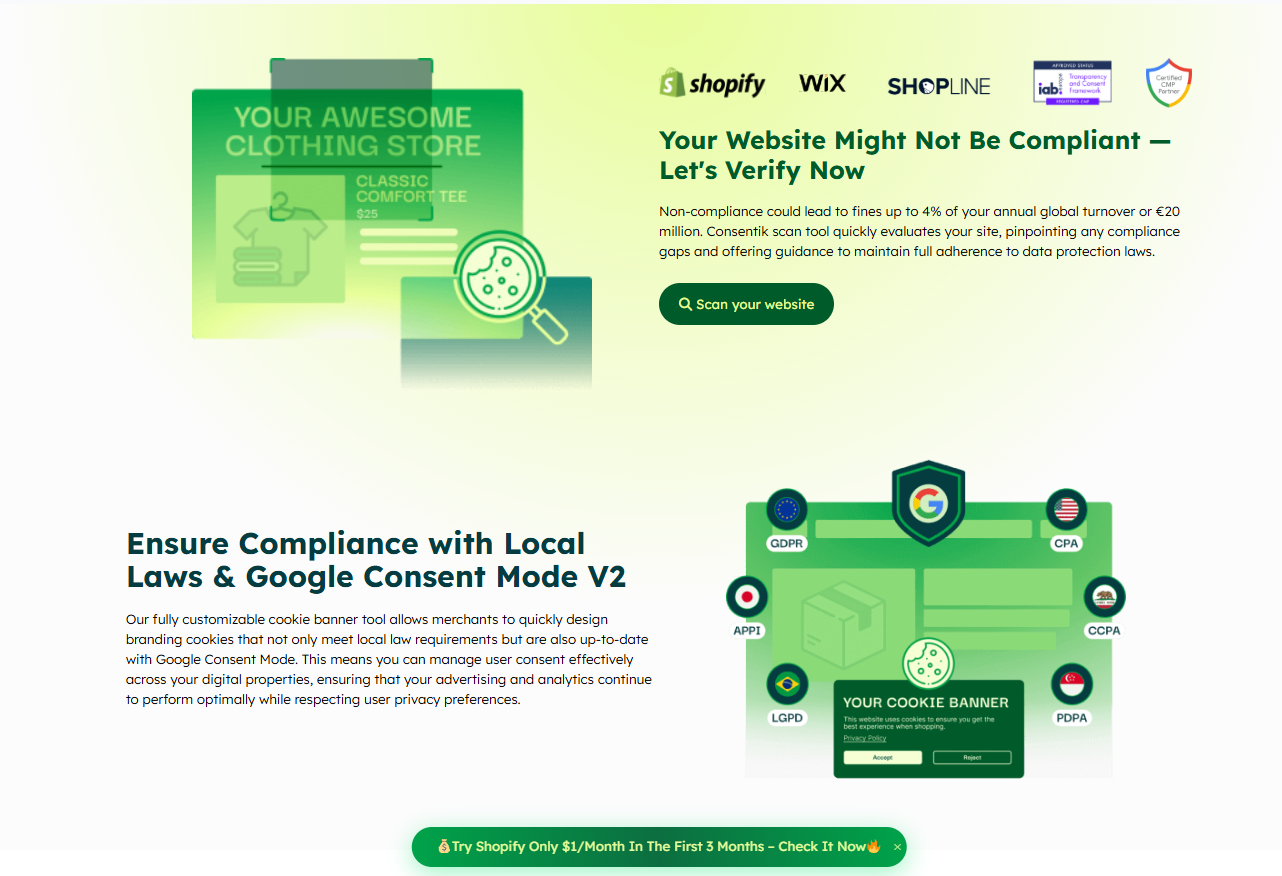 Consentik is a Google CMP Partner and Microsoft-approved CMP with dedicated apps for Shopify, Wix, and SHOPLINE. It takes care of the entire consent flow for you – from showing the banner and storing user preferences to blocking scripts and sending the right signals to Google – all without writing a single line of code.
- Consentik supports both Basic and Advanced Google Consent Mode v2, so when you enable Advanced mode, Google can use anonymized, modeled data to recover conversions even when users decline cookies.
- Sends the right signals automatically – all four consent parameters are passed to Google correctly, so your Analytics and Ads data stays accurate
- Blocks all tracking by default – no tags fire until a user gives permission, so you’re compliant from day one
- Lets users choose what they allow – visitors can accept or decline specific cookie types like analytics or marketing, which works hand-in-hand with Advanced mode’s flexible setup
- Shows banners in multiple languages – great for sites serving users across different countries, especially in Europe
- Covers all major privacy laws – GDPR, CCPA, LGPD, IAB TCF 2.3, Microsoft Consent Mode, and Google Consent Mode v2, all in one tool
- Tracks your consent rates – see how many users accept, decline, or partially consent, so you can decide whether moving from Basic to Advanced mode is worth it for your site
Implement Consent Mode with ease with Consentik
Make privacy compliance easy for Shopify, Wix or any online stores
✔️ 7-day free trial | Cancel anytime